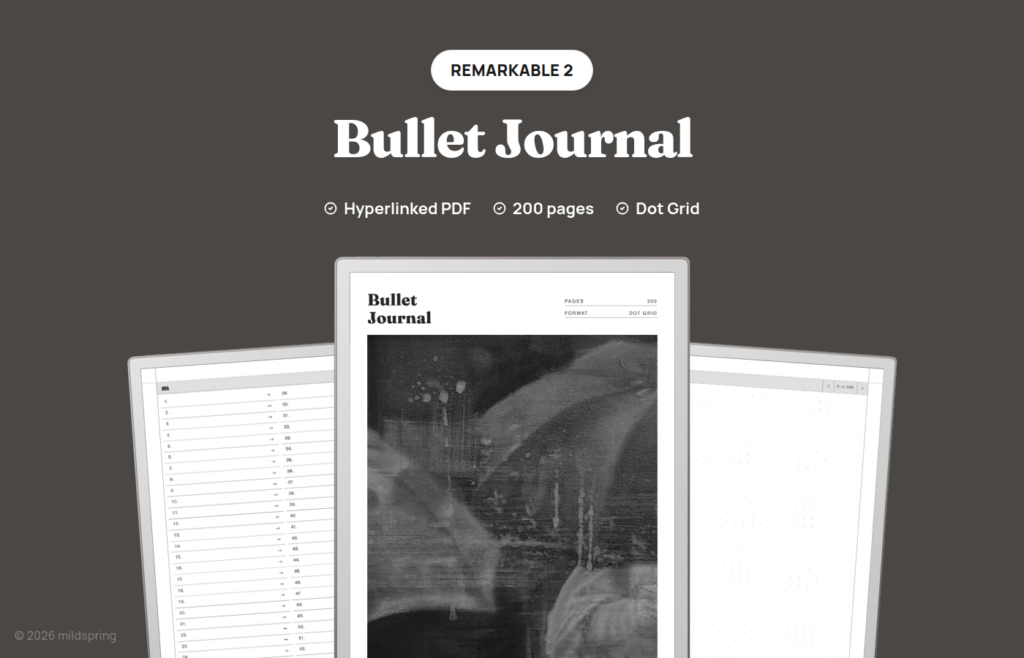
Bullet Journal for reMarkable
$9
One-time purchase, lifetime access.
Also available for
An undated bullet journal PDF for reMarkable 2, Paper Pure, and Paper Pro. 200 dot grid pages and a linked index. You draw the calendars.
This remarkable bullet journal is a hyperlinked PDF built as a blank BuJo shell: 200 dot grid writing pages, a linked Notes index, and breadcrumbs back to the front. It is for rapid logging, habit trackers, collections, and the weekly or monthly layouts you draw with the marker, not for a planner that already decided your year.
reMarkable owners often bounce between thin notebooks and cluttered template packs. This file sits in the middle. The page stays empty on purpose, and the index is already wired so you are not maintaining page numbers in the margin. Title and date bands are intentionally missing so a full-bleed calendar or a dense collection can use the sheet.
Rabia hand-paints every mildspring cover, including this one.
What is inside
- 205 pages in the PDF. Cover, four Notes index pages, and 200 writing pages.
- A single Notes section with 200 numbered, tappable rows.
- One page per index entry. Pair two numbers when a spread needs a verso and a recto.
- Breadcrumbs on writing pages that return to the Notes index.
- Dot grid only in one download for the model you pick.
- No pre-printed months, weeks, or habit charts.
- PDF bookmarks for cover and Notes index in reMarkable’s navigation layer.
Running a blank bullet journal on reMarkable paper
The point of BuJo on this hardware is the same as on paper: short symbols for tasks and events, then bigger custom pages when a theme needs space. Because the template is only dots, you can keep a future log near the front, run dailies for a stretch, and park a project collection wherever you still have empty numbers.
A two-page weekly often uses facing index items, say 12 and 13, with columns drawn across both. A habit tracker might claim a single tall page with a grid you rule once and reuse by eye. None of that needs a software layer. The marker writes into the PDF while the links keep the book searchable from the front matter.
Layers still behave like they do on any other reMarkable document. Undo, redo, and the usual pen tools keep working because we did not replace the reader. We only shipped a PDF with internal links and a quiet ruling.
We are not shipping a second guided version with printed prompts. If you want prompts, write them. The notebook stays out of the way.
How it moves on reMarkable
The file opens as a normal document in reMarkable’s reader. You do not install it into the system template picker, and you do not need a third-party app for the links to work.
Tap a Notes index row to jump. Tap the breadcrumb to return. Page turns with the usual gestures still apply, which is how you review a multi-page collection without resetting to the index each time.
The outline bookmarks give a second door into the cover and the Notes index. That matters on devices where people prefer the sidebar over on-page chrome.
If you rename the document after import, the links inside the PDF still point at page numbers, so renaming the library title does not break navigation.
About this remarkable bullet journal sizing
reMarkable ships two page sizes, so we export two cuts and you choose at checkout.
reMarkable 2 and Paper Pure share the 10.3 inch class panel. Our page for those models is 157 by 210 millimetres, drawn to land at native size rather than letterboxed inside a border.
Paper Pro uses the larger 11.8 inch screen, so that download is 180 by 240 millimetres. Same 200 writing pages and the same linked Notes index, redrawn so the dot pitch and margins match the bigger panel.
One honest note for Paper Pro owners: the template itself is black and grey. Colour handwriting still works on the device. We are not putting colour washes or tinted trackers into the PDF.
Looking for the same journal on another brand? See the Supernote, Kindle Scribe, and Quaderno listings.
Getting it onto your reMarkable
Checkout provides one PDF for the model you selected. Store a backup on a computer before you move it across.
The cable-only route is the USB web interface. On the tablet, enable it under Settings and then Storage, connect USB, open 10.11.99.1 in a desktop browser, and drag the PDF into the window. Traffic rides the cable, so Wi-Fi can stay off. If the toggle will not enable, swap the cable or flip the plug before blaming the software.
The reMarkable desktop app, mobile apps, and the browser at my.remarkable.com also move documents through your account if that is already how you work. Either path leaves a document in the library that opens the same way.
Keep the file as a PDF. Exporting through a converter that flattens links is how people end up with a pretty picture and no taps. If a tool offers “optimize” or “flatten,” skip it for this notebook.
Which of our reMarkable notebooks to pick
Five notebooks share this brand path. Pick by structure, not by cover art.
Take this listing when you want a blank, undated BuJo with a linked index and room to invent spreads on reMarkable hardware.
Take the Classic Notebook for long-form notes with five pages per entry, 500 writing pages, and four rulings in the purchase.
Take the Multi-Section Notebook when ten named sections and roughly 1,000 pages keep streams apart.
Take the Cornell Notes Digital Notebook for cue, notes, and summary bands on every page.
Take the Business Meeting Notebook when meeting forms beat blank dots for most of your week.
Paper Pro colour versus the template
Paper Pro buyers sometimes expect the template to arrive with colour accent bars or tinted section headers. Ours does not. The ruling and chrome are black and grey so the page stays quiet and the export stays small. Colour belongs to your strokes, highlighters, and any layers you add while writing.
On reMarkable 2 and Paper Pure the question does not come up, because those screens are monochrome. The same blank BuJo structure still applies: rapid logs near the front, collections later, and index labels written by hand beside the numbers.
If you switch between a Paper Pure and a Paper Pro, buy both cuts rather than stretching one file. The 157 by 210 mm page and the 180 by 240 mm page are different drawings, and the dot pitch will not survive a casual resize.
USB web UI quirks worth knowing
The address 10.11.99.1 only answers while the tablet is connected and the storage web interface is enabled. It is not a website on the public internet. If the browser spins, check the cable first, then confirm the toggle under Settings and Storage is still on.
Once the PDF lands, disable the web interface if you prefer the tablet locked down again. The notebook does not need that interface to open or to follow links afterward.
What you get at checkout
One purchase at $9, one PDF for the reMarkable model you chose, and no subscription. Re-download when a volume fills. Dot grid is the only ruling in the order.
If you use both cloud sync and the USB web UI at different times, stick to one path for a given transfer so you do not end up with two near-identical documents and wonder which one holds today’s handwriting. The links are identical in each copy, but the ink is not.
Gesture preference varies by owner. Some people live in the breadcrumb and index. Others turn pages with the marker button and only jump when a collection starts. Both approaches work because we did not override the reader’s normal page turns.
Frequently asked questions
How many pages are in the PDF?
205 pages: cover, four Notes index pages, and 200 writing pages.
Which reMarkable models are supported?
reMarkable 2 and Paper Pure at 157 by 210 mm, and Paper Pro at 180 by 240 mm. Pick your model at checkout.
Is the Paper Pro file in colour?
No. The template is black and grey. Marker strokes can still use colour on Paper Pro.
Do monthly spreads arrive already drawn?
No. Blank dots only. You draw monthly and weekly layouts yourself. The linked index handles finding them later.
Why no title and date line?
BuJo pages often need the full sheet for calendars and trackers. A printed title band gets in the way, so we left it off.
Will links work without a reMarkable account?
Yes. Import over the USB web UI at 10.11.99.1 if you want zero cloud, then open the PDF offline.
Is it dated?
No printed dates. Start when you want and assign pages as you go.
How many files come with the purchase?
One PDF for the device size you select. Not a four-ruling bundle.
Does this listing cover Move?
No. This listing covers reMarkable 2, Paper Pure, and Paper Pro only. Move uses a different page size we do not ship here.