Cornell Notes Digital Notebook for reMarkable
$9
One-time purchase, lifetime access.
Want different sections or page styles? Customize this notebook
Also available for
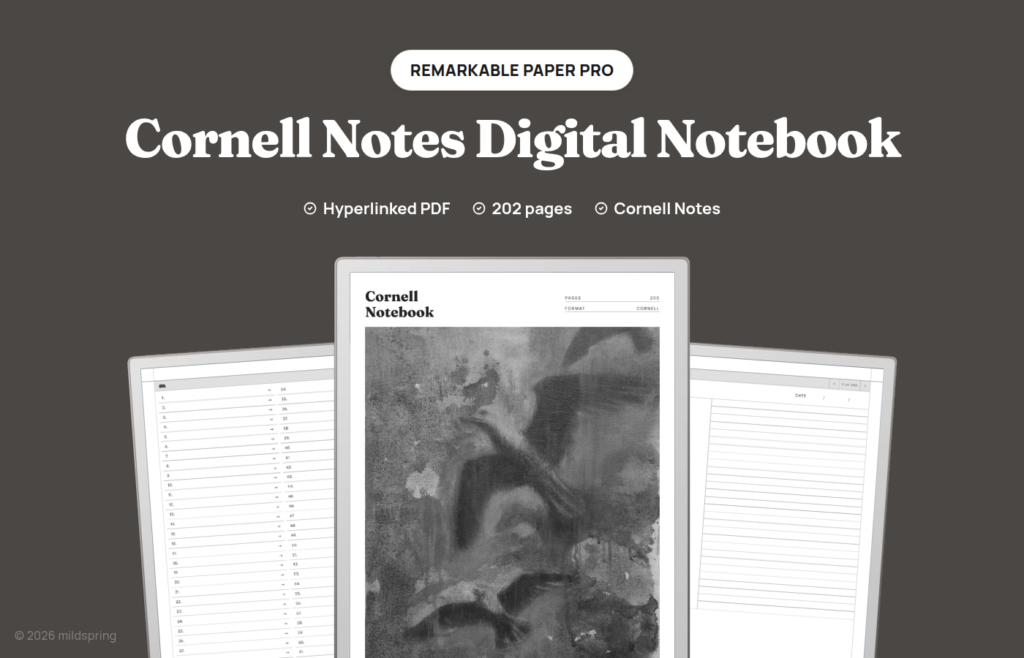
Cornell-method pages for reMarkable 2, Paper Pure, and Paper Pro: cue, notes, and summary, with a linked index of 200 pages.
The Cornell Notes Digital Notebook for reMarkable is a cornell notes reMarkable PDF for people who want the page to hold structure while they write. Each of the 200 pages keeps a cue column on the left, a lined notes block on the right, and a summary band along the bottom, which is the layout students and readers have used on paper for decades. It’s undated, so nothing on the cover or the first page pretends you started on a particular Monday.
It opens on a Notes Index of 200 numbered rows. Tap one and you land on that page. A breadcrumb at the top of every writing page sends you back. Topic and date fields sit blank until you fill them. One PDF per device size, no ruling bundle.
The cover artwork was painted by Rabia, who hand-paints the cover of every mildspring product.
Sized for your reMarkable not resized
We cut this notebook to two page sizes because reMarkable ships two screens. The reMarkable 2 and the Paper Pure both use a 10.3 inch panel at 1404 by 1872 pixels, which comes out to a 157 by 210 millimetre page. The Paper Pro is the 11.8 inch screen at 1620 by 2160 pixels, which works out to 180 by 240 millimetres.
You pick your device at checkout and get the file drawn for that screen. The page lands at native size, so the cue column width, the notes ruling, and the summary band sit where we put them. A notebook built for one screen and stretched onto another gets you thin grey lines and a page that floats inside a border, which is the thing we set out to avoid.
If you’re on the Paper Pro, one honest note: the screen is colour, and this notebook isn’t. The pages are drawn in black and grey, so you get the sharper 229 ppi rendering but no colour in the template itself. Your own writing shows up in whatever colour you pick, which is where most people want the colour anyway.
What is inside
- 205 pages in the file: cover, four Notes Index pages, and 200 Cornell writing pages.
- 200 one-page entries numbered 01 to 200.
- Cue column, notes block, and summary band on every writing page (cornell-tight).
- Topic and date fields on each page for the lecture title, chapter, or session name.
- A breadcrumb back to the Notes Index on every page.
- PDF bookmarks for the cover and the index in reMarkable’s navigation panel.
How Cornell works when you read and when you listen
reMarkable owners often use the tablet for long reading stretches. Cornell fits that habit because the cue column can hold chapter markers and questions while the notes block takes the actual extracts and reactions. When you finish a chapter, the summary band is the place for the paragraph you’d write on a sticky note if the book were paper.
In a live lecture the rhythm flips. The notes block runs continuously while you listen. The cue column stays sparse until a term or a question deserves its own short mark. After the talk you fill the summary band once, which is usually enough to make next week’s review start at the bottom of the page instead of at the top of a wall of handwriting.
We kept one page per entry on purpose. A topic that needs more room takes the next numbered page. A short reading session can leave most of a page empty without breaking a five page chapter system you never asked for. The index still lists every page, so empty pages stay findable if you labelled the topic field.
A seminar week might look like this on the tablet. Monday’s lecture fills pages 20 and 21. Tuesday’s paper notes sit on page 22 with author names in the cue column. Thursday’s review starts by skimming summary bands, then tapping the Notes Index when a gap shows up. The breadcrumb pulls you back to the list when you’re done.
How cornell notes reMarkable navigation works
The file opens in reMarkable’s own reader. There’s no companion app, no template to install into the system, and nothing to sync beyond the file itself, because a hyperlinked PDF is just a document to the device.
Tap a row on the Notes Index and you jump to that page. Tap the breadcrumb at the top of a writing page and you’re back at the index. Swipe and the pages turn the way they always do. The PDF also carries proper bookmarks for the cover and the Notes Index, so reMarkable’s own navigation panel gives you a second way in without hunting for a page number.
Getting it onto your reMarkable
Checkout gives you one download for the model you picked, at a few megabytes. Save it somewhere sensible on a computer first.
The simplest route with no cloud involved is the USB web interface. Turn it on under Settings and then Storage on the tablet, plug in the cable, open 10.11.99.1 in a browser, and drag the PDF into the window. The transfer runs over the cable rather than your network, so it works with Wi-Fi off. If the toggle won’t enable, it’s usually the cable, and swapping it or turning the plug around tends to sort it.
The reMarkable desktop and mobile apps work too, as does the browser at my.remarkable.com, if you’d rather have the file sync through your account. Either way it arrives as a document in your library and opens the same.
Which of our reMarkable notebooks to pick
We draw five for reMarkable, and they differ in how the pages are divided rather than in how they look. This Cornell file is the study and reading layout.
Take this one when you want cues, notes, and a summary fixed on every page. That’s the shape of lecture notes and of reading notes you plan to revisit.
The Classic Notebook is the general long notebook: 100 entries at five pages each, four page styles as four PDFs.
The Multi-Section Notebook divides 1,000 pages into ten named sections with their own indexes when work, study, and personal notes shouldn’t share one contents page.
The Business Meeting Notebook lays 200 pages out around attendees, agenda, notes, and action items.
The Bullet Journal is 200 dot grid pages for short logged entries.
The same Cornell notebook is drawn for other tablets as well, so there are Supernote, Kindle Scribe, and Quaderno versions, each cut to that screen.
What you get at checkout
One purchase, one PDF for the device you select, $9, and no subscription or expiry. Keep it, re-download it, and load it onto your own tablets as needed. When the 200 pages are full, download a fresh copy and start clean.
Why the margins matter on two screen sizes
The cue column sits on the left edge of every page. On the 157 by 210 mm file used by reMarkable 2 and Paper Pure, that strip has to stay wide enough to write a short word with a stylus, which is why we draw the page at native size instead of scaling a different tablet’s PDF. On the Paper Pro’s 180 by 240 mm page the same three zones grow with the screen, so the notes block gains room without turning the cue column into a decoration.
If you ever move from a reMarkable 2 to a Paper Pro, buy the Paper Pro variation rather than stretching the older file. The links still work on a stretched PDF, but the ruling spacing and the cue width stop matching the hand you trained on the smaller screen.
Frequently asked questions
How many pages is it really?
205 pages in the file: a cover, four Notes Index pages, and 200 Cornell writing pages.
Which reMarkable models does this fit?
The reMarkable 2, the Paper Pure, and the Paper Pro. The reMarkable 2 and Paper Pure share a 10.3 inch screen and get the 157 by 210 mm page. The Paper Pro is 11.8 inches and gets a 180 by 240 mm page. Choose your model at checkout.
Does it use colour on the Paper Pro?
No. The template is drawn in black and grey. Your own handwriting appears in whatever colour you select on the device.
How many files do I get?
One PDF for the model you pick. Every page is already the Cornell layout, so there is no separate lined or blank file in this purchase.
Is it dated?
No, it’s undated. You fill in the topic and the date on each page, so you can start any day and work through the 200 pages in any order.
Do the links work without Wi-Fi?
Yes. Once the file is on the tablet, the index rows and breadcrumbs work offline in reMarkable’s reader. You can also move the file over with the USB web interface and no cloud at all.
What is the Cornell method on this page?
Three zones on every page. Main notes go in the lined block on the right. Short cues and questions go in the left column. A short recap goes in the summary band at the bottom after the session.