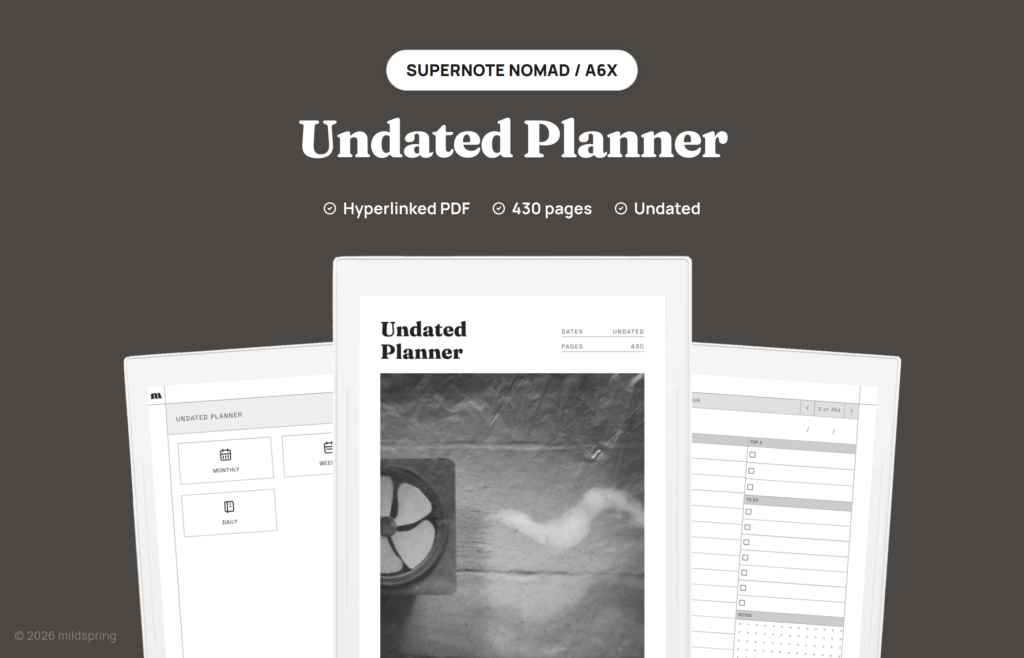
Planner · undated
Undated Planner With a Page for Every Day
Months, weeks and days, all linked, with blank dates you fill in. Start in any month and skip a week without wasting pages.
- 430 pages
- 364 daily pages
- Sunday or Monday start
- Undated
- 19 tablet models
$12 pay once, download and keep
1 · Your tablet
2 · Model
Or get every notebook, planner and puzzle book in the Everything Bundle.
An undated planner has one big advantage over a dated one: it can’t fall behind. This one has 12 monthly pages, 52 weekly pages and 364 daily pages, and every date line is blank. You write in the dates as you go, so you can start in March, set it down for two weeks, and pick it back up without a row of empty printed days staring at you.
How the pages connect
The contents page links to the monthly, weekly and daily sections. On a week page, tap a day name to open that day. A breadcrumb at the top of every page takes you back to the week or the contents, and arrows step to the page before or after.
Each monthly page has a blank calendar with six rows that you number yourself, plus a dot grid area for notes. Weekly pages give each day a dot grid row and leave a notes row at the bottom. Both Sunday-start and Monday-start versions are in the download.
A daily page that fits a real day
Every daily page has an hourly schedule from 6am to 9pm, a Top 3 list, seven to-do boxes and a dot grid box for notes. One simple way to use it:
- Fill in the Top 3 first, before you touch the schedule.
- Block out appointments, then fit the Top 3 around them.
- Use the to-do boxes for small stuff that doesn’t need a time slot.
- Jot anything else in the notes box and move it to a week page later.
Why 364 days and not 365? The days follow the weeks, 52 weeks of seven days, so every day name on a week page has its own page to open. If you’d rather have the dates printed for you, our 2027 Daily Planner uses the same kind of daily page.
The planner is drawn at each tablet’s own page size and comes for Supernote, reMarkable, Kindle Scribe, BOOX, Kobo, Quaderno and iPad.
Pick the file for your tablet
Same pages on every tablet, drawn at each screen's own size. Each link opens that brand's page with its models.
| Tablet | Models | Price |
|---|---|---|
| Undated Planner for Supernote | Supernote Nomad / A6X, Supernote Manta (A5X2) | $12 |
| Undated Planner for Kindle Scribe | Kindle Scribe (2024, 10.2"), Kindle Scribe 11" (2025) / Colorsoft | $12 |
| Undated Planner for reMarkable | reMarkable 2, reMarkable Paper Pure, reMarkable Paper Pro, reMarkable Paper Pro Move | $12 |
| Undated Planner for Quaderno | Fujitsu Quaderno A5 | $12 |
| Undated Planner for BOOX | BOOX Tab Mini C (7.8"), BOOX Note Mini C (8.5"), BOOX Note Air 10.3", BOOX Tab X C / Note Max 13.3" | $12 |
| Undated Planner for Kobo | Kobo Libra Colour, Kobo Sage, Kobo Elipsa / Elipsa 2E | $12 |
| Undated Planner for iPad | iPad 13 inch (Air, Pro), iPad 11 inch (iPad, Air, Pro), iPad mini | $12 |
Questions
Can I start in the middle of the year?
Yes. Start on Month 1 and Week 1 whenever you begin, write in the dates, and carry on from there.
How many pages does it have?
430: a cover, a contents page, 12 monthly pages, 52 weekly pages and 364 daily pages.
Do weeks start on Sunday or Monday?
Both versions are included, so use whichever you like.
How is this different from a dated planner?
A dated planner has every date printed for one year. This one leaves the dates blank, so it works for any year and you don't lose pages to weeks you skip.