Bullet Journal for Quaderno
$9
- Instant download
- Lifetime access
- Works offline
Save with the bundle
$52 bought separately Get this and 4 more for $35Customize
Want different sections or page styles? Customize this journal
Also available for






About this product
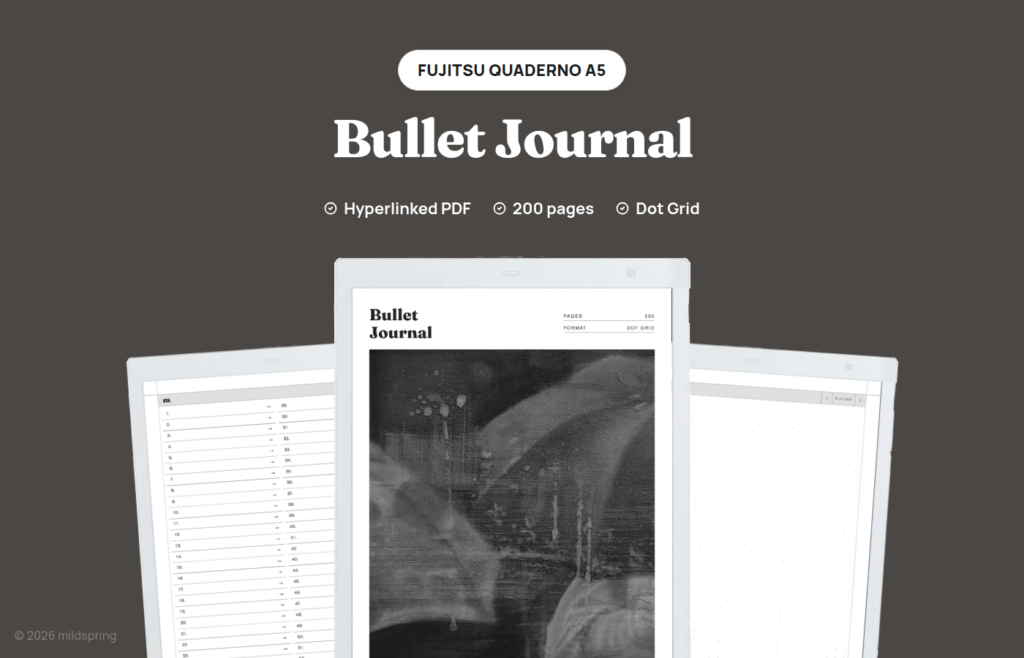
200 undated dot grid pages for Quaderno A5 and A5 Gen2, with a linked index. You draw monthlies. Not A4.
This quaderno bullet journal is a hyperlinked PDF for people who want a real BuJo on Fujitsu glass: 200 undated dot grid pages, a linked Notes index, and breadcrumbs that pull you back to the front. Use it for rapid logging, habit trackers, collections, and weekly spreads you rule yourself. There are no pre-printed months waiting to be wrong for your year.
Quaderno is already good at plain PDFs. This file leans into that. You get one quiet notebook with navigation wired in, instead of a stack of tiny templates you have to remember by filename. We left title and date fields off so a calendar block or a dense collection can sit edge to edge on the dots.
The cover is one of Rabia’s hand-painted pieces, the same way every mildspring product starts.
What is inside
- 205 pages. Cover, four Notes index pages, and 200 writing pages.
- One Notes section with 200 numbered links, one page each.
- A linked index that the Quaderno reader follows on tap.
- A breadcrumb on writing pages that returns to the index.
- Dot grid ruling as the only style in the download.
- No printed title or date strip crowding the top of the page.
- PDF bookmarks for cover and Notes index in the device outline.
Blank dot-grid BuJo on a Quaderno A5
Fujitsu’s A5 panel is close to a paper notebook in feel, which is why a blank BuJo works well here. You can keep a future log in the early numbers, run daily logs for a long stretch, then park a reading list or a household tracker later in the book without fighting a printed calendar.
Because each index entry is a single page, a wide weekly layout usually takes two consecutive numbers. Draw the columns once, leave the facing page for tasks or a tiny habit strip, and label those rows on the index in your own handwriting. The taps still land correctly because the links are fixed page targets.
The stylus on Quaderno prefers a page that does not shout. Dot grid gives alignment without the visual noise of a dense printed planner, which matters when you are reviewing a week of rapid logs under indoor light.
We are not shipping sticker packs, mood icons, or morning-pages prompts inside the PDF. The product is the empty page plus the navigation. Everything else is your system.
How navigation works on Quaderno
Open the PDF in the Quaderno’s built-in reader. No side app is required for internal links.
From the Notes index, tap a row to jump to that writing page. From a writing page, tap the breadcrumb to return. Ordinary page-turn gestures still move you through a multi-page collection when you do not want to bounce home between every sheet.
The outline bookmarks expose the cover and the Notes index if you prefer the panel over on-page links. Either route is ordinary PDF behaviour, which is why the same file keeps working after a firmware update as long as Fujitsu’s reader still follows links.
If you duplicate the file on the device to start a second volume, each copy keeps its own handwriting and its own place in the library, while the internal links continue to point at pages inside that copy.
About this quaderno bullet journal A5 cut
This listing is the A5 cut only. The page is 157 by 210 millimetres, drawn for the Quaderno A5 and A5 Gen2 screens so the dots fill the panel at native size instead of floating inside a scaled border.
Quaderno A4 is a different file we do not include here. Stretching this A5 PDF onto an A4 panel changes the ruling pitch and wastes margin. If you are on A4, wait for an A4 export rather than forcing this one.
The same journal exists for Supernote, Kindle Scribe, and reMarkable when you keep multiple devices.
Getting it onto your Quaderno
After payment you download one PDF. Keep a spare copy on a computer before you connect the tablet.
Move the file across with Fujitsu’s desktop tools, the way you would any other PDF. There is nothing to unzip and nothing to convert. Leave it as a PDF so the fixed layout and the tap links stay intact.
Some people rename the file on the computer to include the year or volume number before copying it across. That helps when a finished journal stays on the device beside a fresh one. The links inside do not care what the filename is.
Once the document is on the tablet it opens offline. Handwriting saves into the file as you write.
Which of our Quaderno notebooks to pick
We publish five notebooks under the Quaderno templates path. Choose by how the pages are divided.
Pick this listing when you want a blank, undated BuJo shell with a linked index for logs and self-drawn spreads on Quaderno A5 hardware.
Pick the Classic Notebook when you want a long general notebook with five pages per entry, 500 writing pages, and four rulings in one purchase.
Pick the Multi-Section Notebook when ten sections and about 1,000 pages should keep topics apart.
Pick the Cornell Notes Digital Notebook when cue, notes, and summary bands belong on every page.
Pick the Business Meeting Notebook when meeting structure matters more than blank dots.
They all share tap-to-jump links on the A5 page size, so the navigation habit transfers.
Living with one A5 volume on Quaderno
Most people do not need an A4 BuJo for daily logging. The A5 page is large enough for a week across two sheets and small enough to hold on a sofa or a train seat. That is why this listing stays A5-only instead of promising one file for every Fujitsu screen.
A practical habit is to keep the live volume in an easy folder on the device and move finished volumes into an archive folder once they fill. The links inside each PDF remain local to that file, so an archive still opens and jumps correctly years later.
If you share a household Quaderno, give each person a separate download and filename. Handwriting and bookmarks stay inside each PDF, which keeps two systems from colliding on the same 200 pages.
A5 Gen2 and the same page drawing
A5 Gen2 keeps the same active page size class we draw for, so this export is meant for both the earlier A5 and Gen2 owners. What changes between those devices is hardware refinement, not the millimetre footprint of the notebook page we target.
That is different from jumping to A4, where the panel class changes enough that we refuse to sell this file as a fit. If Fujitsu ships another A5-class revision with the same 157 by 210 mm page, this download remains the correct starting point until we publish a newly measured cut.
What you get at checkout
One purchase, one A5 PDF, $9, and no subscription. Re-download for a fresh 200-page volume whenever you fill one. Dot grid is the only ruling included.
Quaderno folders are worth a minute of setup before the journal gets busy. A top-level folder for live notebooks and another for finished volumes keeps the document list readable once you are several months into the method.
Screen protectors and cases change how the Quaderno feels in the hand, but they do not change the page size we drew. If a case adds a slight bezel shadow, the notebook still lands at 157 by 210 mm inside the active area.
Frequently asked questions
How many pages come in the file?
205 pages in the file: a cover, four Notes index pages, and 200 writing pages.
Does this fit Quaderno A4?
No. This is the A5 / A5 Gen2 cut at 157 by 210 mm. A4 needs a different export.
Are weekly and monthly layouts included?
Not as printed spreads. You draw them on the blank dots. The linked index is what we supply for navigation.
Why are title and date fields missing?
So calendars, trackers, and collections can use the full page. You can still write a title anywhere on the grid.
Do links work on Quaderno?
Yes. Index rows and breadcrumbs are standard PDF links. Bookmarks cover the cover and the Notes index.
Is the journal dated?
No. Start any time and assign the 200 pages as your system needs.
How many files are in the order?
One PDF. This is not a four-ruling bundle like the Classic Notebook.
Is Fujitsu software required after the copy?
No. Fujitsu’s desktop tools move the file across, and the notebook opens offline in the built-in reader.
Can more than one volume stay on the tablet?
Yes. Download a fresh copy when a file fills, rename it on the computer if you want, and load the new volume beside the old one.
Delivery and refunds
Delivery
Instant download after checkout. Add the PDF to your device with its companion app or cloud sync. Need help? See our step-by-step guides.
Refunds
Since these are digital files, we can't offer refunds after download. If something is wrong with your file, get in touch and we'll make it right.