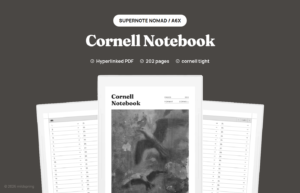
Cornell notes digital setups work best when the page layout matches how you actually review notes later. If you are moving from paper or a generic PDF, the cue column, note area, and summary strip need to stay in the right proportions on your tablet screen.
This guide covers what to look for in a Cornell layout on e-ink, how it differs from a blank or lined notebook, and where to start if you want a file you can import today.
What Cornell notes digital files include
A proper Cornell page has three zones. A narrow cue column on the left for questions and keywords. A wider notes area on the right for lecture or meeting capture. A summary row at the bottom for a quick recap after the session.
On paper, you draw those lines once and photocopy the page. On an e-ink tablet, you want a PDF sized to your device so the columns land in a usable width. A letter-sized template shrunk to fit a small e-ink screen turns the cue column into a sliver.
Why e-ink changes the workflow
E-ink tablets reward structure. You are not flipping pages quickly. You are writing, then revisiting notes days later. Cornell fits that rhythm because the summary strip forces a five-minute review while the session is still fresh.
Hyperlinked notebooks add one more layer. Tap an index row to jump to the Cornell page for a lecture or client. Tap the breadcrumb to jump back without scrolling. That is the piece most printable Cornell templates miss.
Cornell vs lined or dot grid pages
Lined pages are fine for freeform capture. Dot grid pages give you structure without visible rules. Cornell is for study and review cycles where you split facts from cues on purpose.
If you only take meeting notes, a meeting layout or a simple lined section may feel lighter. If you are prepping for exams or certification, Cornell pages pay off fast. Our notebook style guide walks through when each page type makes sense.
What to check before you buy or build
- Screen fit. The PDF should match your tablet height and width, not a scaled-down print page.
- Repeatable pages. You need dozens of identical Cornell spreads, not one sample page.
- Navigation. A linked index saves you from hunting page 47 during review week.
- Export habits. If you archive notes weekly, leave margin space for tags or dates.
A ready-made Cornell notebook for Supernote
We built a Cornell Notes Digital Notebook for Supernote with 200 Cornell pages, a linked index, and pages sized for the Nomad and Manta. Import the PDF, tap an index row, and start in the cue column without resizing anything.
For a full Supernote walkthrough, from setup to pen settings and review, read our Cornell note-taking method on Supernote guide.
Browse the rest of our Supernote templates if you want a different page layout for meetings, journaling, or long-form notes.