Most digital notebook setups start with a good intention and end in a mess. You make a section for everything, then a section inside that section, then you stop opening half of them. The freedom that made digital feel better than paper is the same freedom that ends up burying your notes.
When I built the Multi-Section Notebook for Supernote, I had to pick a number of sections. I landed on 10. Not from a study or a long round of testing. It just felt balanced. This post is me explaining why that instinct holds up, and why I think 10 is close to the right number for most people.
The problem with “as many as you want”
On paper you are limited. A notebook has the pages it has, and that is the end of it. Digital removes that limit. You can have fifty sections, folders inside folders, tags stacked on tags. It sounds like an upgrade.
In practice, unlimited structure asks you to make a decision every single time you write something down. Which section? New one or existing one? Does this belong under the project or under the client? Every note turns into a small filing problem before you have even finished the thought.
The real cost is not storage. It is attention. When everything is possible, nothing has an obvious home, so you spend your energy organizing instead of writing. A notebook is supposed to hold your thinking, not become a second job.
The problem with too few
Go the other way and you hit a different wall. Three or four sections feels clean on day one, but real life does not fit into four buckets. Daily notes, a project, a class, a reading list, and a place for stray ideas is already five. With too few sections you start cramming unrelated things together, and a section called “Misc” quietly becomes the place where notes go to die.
Why 10 sits in the middle
Ten is enough to give each part of your life its own place without turning the notebook into a system you have to maintain. It covers the things you actually return to, and still leaves a couple of sections spare for whatever comes up. It is also a number you can hold in your head. You know what is in section 3 without having to check.
I am not going to pretend I arrived at 10 through rigorous testing. I picked it because it felt balanced, and the longer I have used it, the more that instinct has held. Enough room to keep things apart. Not so much room that keeping things apart becomes the main task.
How I use it, and other ways that work
The thing I like about 10 sections is that the same notebook reshapes itself around whatever you are doing. Here is how I use mine, along with a few other setups that fit the number well.
As a subject notebook
This is how I use mine. Each section is a subject. CS101 in one, MTH202 in another, and so on down the list. When I open it to take notes, I am not deciding where a lecture goes. The subject is the section. That decision was made once, on day one, and I never think about it again.
Ten sections happens to map almost perfectly onto a full course load, with room left over for something like a general scratch section or a revision section near the end of term.
For work and projects
If most of your day is work, you can give each active project its own section and keep a few fixed ones around them. Something like a daily notes section, one section per project, a meeting log, and a section for follow-ups and to-dos. When a project wraps up, that section becomes your archive for it, and the slot frees up for the next one.
For freelancers and client work
One section per client is a clean way to keep separate work from blurring together. With ten sections you can run several clients at once and still keep a couple of sections back for your own admin, invoices to chase, or ideas for the business itself.
For reading and research
If you read a lot, you can split by source or by theme. A section for books, one for articles and longer pieces, one for quotes and passages worth keeping, one for your own responses and half-formed ideas. The separation makes it much easier to come back months later and actually find the note you remember writing.
For everyday life
Outside of work, ten sections covers a surprising amount of life. A journal, a health and fitness section, finances, home and errands, travel plans, gifts and occasions, and a catch-all for ideas. Each one is small on its own, but together they replace the scattered notes that usually live in five different apps.
For a single big project
You do not have to split by topic at all. If you are writing a thesis, planning a wedding, or building something, you can use all ten sections for the parts of that one project. Research in one, outlines in another, drafts, tasks, contacts, budget, and so on. The notebook becomes a binder for a single thing.
The pattern underneath all of these is the same. One clear context per section, and a section or two kept open for whatever the month throws at you.
How the notebook is built around that number
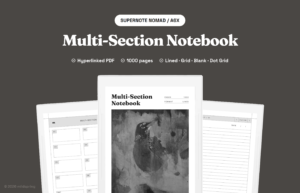
The Multi-Section Notebook for Supernote is a single hyperlinked PDF. Ten numbered sections, 100 writing pages each, 1,000 pages in total. The cover opens to a contents page that lists all ten sections. You tap a section to open it, tap its index to land on a page, and a nav row at the top of every page takes you back to the section or the cover in one tap. There is no extra app, since it runs in the Supernote’s built-in reader.
The 100 pages per section is part of the balance too. It is deep enough for a full term or a long project, and shallow enough that you can scan an index and actually find things. You pick one ruling for the whole notebook: Lined, Blank, Dot Grid, or Grid.
It is currently sized for the Supernote Nomad, so the page matches the screen exactly with nothing scaled or cropped. The cover art is hand-painted by my co-founder, Rabia, which is true of every mildspring product.
The short version
Digital lets you build any structure you want, which is exactly why a sensible default is worth something. Ten sections is enough to keep your notes separated and findable, and few enough that you never have to think about the system itself. That was the whole goal: a notebook you organize once and then just use.
If that sounds like the setup you have been missing, you can take a look at the Multi-Section Notebook on the product page.