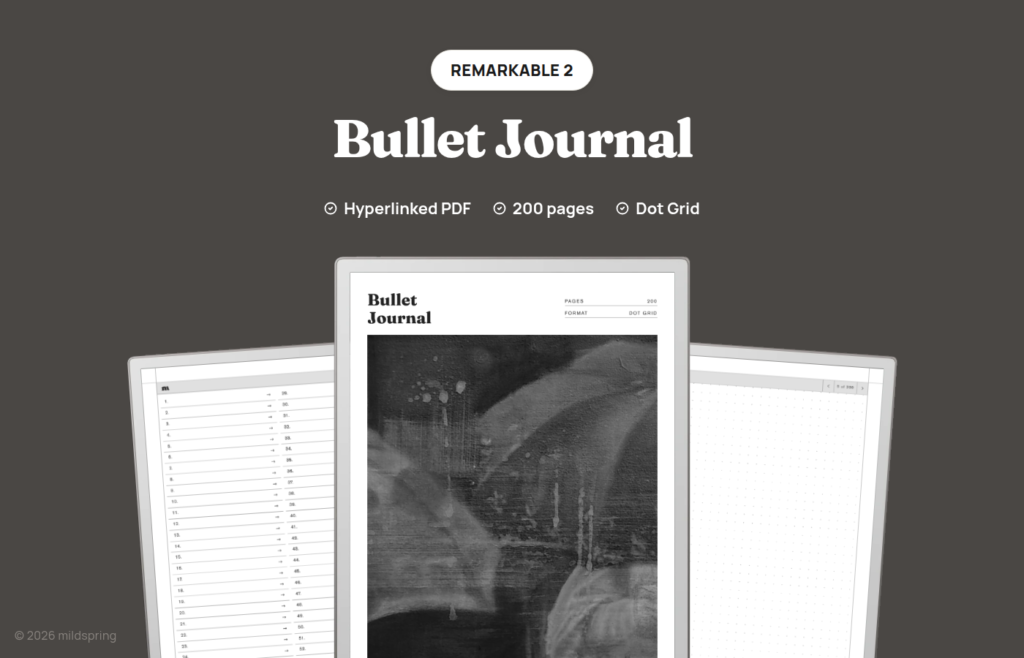
Bullet Journal for reMarkable
$9
- Instant download
- Lifetime access
- Works offline
Save with the bundle
$75 bought separatelyGet this and 6 more for $39Customize
Want different sections or page styles? Customize this journal
Also available for






About this product
A reMarkable bullet journal with 200 dot grid pages and nothing pre-printed, so you build your own logs, trackers and collections while a linked index keeps them findable. It is undated, so you can start any time.
The Bullet Journal for reMarkable is a reMarkable bullet journal template that stays out of your way: a hyperlinked PDF with 200 undated dot grid pages and a Notes index where every number opens its page. You draw your own key, future log, monthly and daily logs, trackers and collections, and the index keeps all of it one tap away.
Most bullet journal templates for reMarkable either print a whole year of spreads you’ll never use, or give you a plain notebook with nothing to help you find things later. This one is the middle ground: blank dot grid pages, plus the linked index a bullet journal needs once it grows past a few weeks.
Rabia hand-paints every mildspring cover, including this one.
What is inside the reMarkable bullet journal
- 200 dot grid writing pages, undated, with no title or date band, so a full-page calendar or tracker can use the whole sheet.
- A Notes index of 200 numbered rows across four pages. Tap a number to open its page, and write what’s there on the line beside it.
- A breadcrumb on every page that takes you back to the index.
- PDF bookmarks for the cover and the index, for when you’d rather use the sidebar.
That’s 205 pages in one file. The Paper Pro Move file runs a few pages longer, because its index pages hold fewer rows.
A simple way to set it up
Because the pages are blank, you decide what goes where. Here’s a starter setup that works well, and the index makes it easy to change later:
- Page 1, Key. Your signifiers: a dot for a task, an X when it’s done, an arrow when you move it, a circle for an event, a dash for a note.
- Pages 2 and 3, Future log. Split each page into six boxes, one per month, for dates further out.
- Page 4, This month. The dates down the left, the month’s tasks on the right.
- Pages 5 onward, Daily log. A short heading for each day and quick bullets under it. Start a new page whenever you need one.
- Collections anywhere. Books to read, a project, a habit tracker: give each its own page and write its name in the index.
For a two-page weekly spread, use facing numbers like 12 and 13 and draw your columns across both. At the end of each month, move what’s still open to the next month and mark the old line with an arrow. That migration step is the heart of the bullet journal method, and rewriting by hand is what keeps the list honest. Our guide to keeping a bullet journal on reMarkable walks through the method in more detail.
Sized for every reMarkable
reMarkable makes three screen sizes, so we draw three versions. Pick yours from the Device menu:
- reMarkable 2 and Paper Pure: 157 by 210 mm, drawn for the 10.3 inch screen.
- Paper Pro: 180 by 240 mm for the 11.8 inch screen, with the dot spacing and margins redrawn to match.
- Paper Pro Move: 92 by 163 mm for the narrow 7.3 inch screen. We assume you’ll hide the toolbar, so the dots fill the whole screen inside a thin, even margin.
The template is black and grey on every model. On Paper Pro and Move, your pen strokes and highlights can still be in colour.
Getting it onto your reMarkable
After checkout you get one PDF for the model you chose. Import it with the reMarkable desktop or mobile app, or drag it into my.remarkable.com in a browser, and it syncs to your tablet. It opens in the normal document reader, so the links work without any extra app, and once it has synced it works offline. Our step-by-step guide covers each route.
Upload the file as it is. Tools that offer to optimise or flatten a PDF can strip out the links.
Want more structure?
If you’d rather not draw your own spreads, the Undated Planner comes with its pages already laid out. For long-form notes, the Classic Notebook gives you 500 pages in four rulings, and the Multi-Section Notebook keeps ten subjects apart. Using another tablet? The same bullet journal is made for Supernote, Kindle Scribe and Quaderno.
Frequently asked questions
Is this a bullet journal template for reMarkable 2?
Yes, and for Paper Pure, Paper Pro and Paper Pro Move too. Each model gets its own file, sized for its screen.
Do monthly spreads come already drawn?
No. The pages are blank dot grid, so you draw your own monthly, weekly and daily layouts. The linked index is what helps you find them again.
Is it dated?
No. Nothing is dated, so you can start any day and use the pages in any order.
Do I need to install it as a reMarkable template?
No. It’s a PDF that opens like any other document, so there’s nothing to install and no developer mode. The links work in the standard reader.
Can I type on the pages with the Type Folio?
reMarkable’s typing works in notebooks, not on the pages of a PDF, so you write on this one with the Marker.
How do I get the file?
After checkout you can download it from your order confirmation page, your order email or My downloads. All our sales are final; if a file is faulty or you received the wrong one, email us within 7 days and we’ll put it right.
Delivery and refunds
Delivery
Instant download after checkout. Add the PDF to your device with its companion app or cloud sync. Need help? See our step-by-step guides.
Refunds
Since these are digital files, we can't offer refunds after download. If something is wrong with your file, get in touch and we'll make it right.
More templates like this

Get every file we make for your reMarkable
25 products in one purchase, $272 if you bought them one by one.
- 8 notebooks and journals
- 9 planners
- 8 puzzle books
- Every product we add later, at no extra cost
$69 $99 one-time
Launch price until 29 December, then $99.
Get the Everything BundleInstant download. Yours to keep, no subscription.