Business Meeting Notebook for Kindle Scribe
$9
One-time purchase, lifetime access.
Want different sections or page styles? Customize this notebook
Also available for
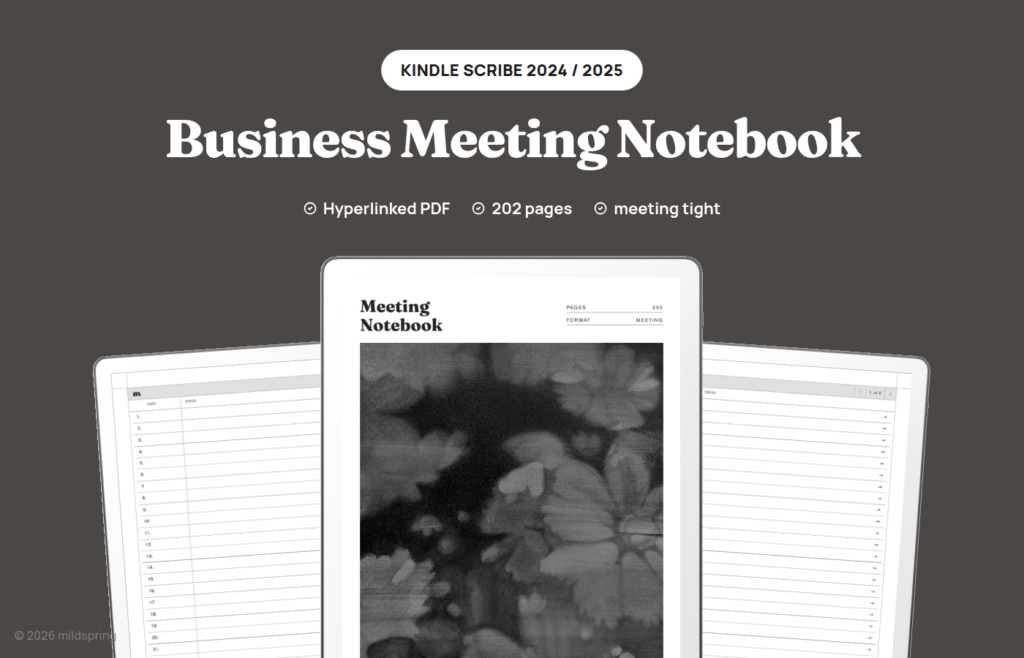
200 meeting pages for Kindle Scribe with topic, attendees, notes, and action items, plus a linked index of past meetings. 10.2 inch Scribe only.
The Business Meeting Notebook for Kindle Scribe is a hyperlinked PDF for people who take most of their notes during meetings rather than between them. Standups, client reviews, hiring interviews, and project check-ins all use the same page: topic, date, time, attendees, location, a lined notes area, and an action list with task, owner, and due columns. The file holds 200 meeting pages, and it’s undated, so you can start in February or in October without a printed month staring back at you. This meeting notebook Kindle Scribe file is one PDF, sized to the 2024 screen.
Open the notebook and you land on an index with Date and Topic columns. Tap a numbered row and the Scribe jumps to that meeting. Every meeting page has a breadcrumb back to the index, which is how you close the loop after a call: fill the index row, then find the page again later without thumbing through the whole file.
The cover artwork was painted by Rabia, who hand-paints the cover of every mildspring product.
You get one PDF. The meeting-tight layout is the product. There is no separate lined or blank download for this notebook.
What is inside this meeting notebook Kindle Scribe file
- 209 pages total. One cover, eight index pages, and 200 meeting pages.
- A linked index with Date and Topic columns. Each numbered row is a tap target to that meeting.
- Header fields: Topic, Date, Time, Attendees, and Location on every meeting page.
- A lined Notes block sized for writing at meeting speed on the 10.2 inch screen.
- An action items panel with Task, In Charge, and Due columns, so decisions leave the page with an owner attached.
- A breadcrumb on every meeting page that returns you to the index.
- PDF bookmarks for the cover and the Notes Index, visible in the Scribe’s navigation panel.
Why the page splits notes from action items
On a plain notebook page, meeting notes and follow-ups share the same ink. A week later you reread a dense paragraph hoping the action item is still in there somewhere. That habit breaks down once you’re logging several meetings a day.
This page keeps the discussion on the left and the commitments on the right. During the call you write in Notes without stopping to format. When someone takes a task, you put it in the action panel while the person is still on the line: the task itself, who is in charge, and when it’s due. Closing the meeting then means scanning the right column, not reconstructing it from memory.
The header fields matter for the same reason. Topic, date, time, attendees, and location sit at the top so the page is searchable by eye when you reopen it. Pair that with the Date and Topic columns on the index, and you can find last Tuesday’s vendor call without opening twenty pages first.
Each meeting gets one page. A forty-minute strategy session and a five-minute sync both own a full slot. If you truly need more room, continue on the next numbered page and mark the topic field so the two pages stay connected. The 200 pages don’t reshuffle, and every index link stays pointed at the same page number.
A week of meetings on the Scribe
Say Monday is a vendor call. You open the next free meeting page, write the vendor name in Topic, stamp the date and time, list who joined in Attendees, and take notes on the left while the action panel collects the two follow-ups you agreed. After the call you fill the matching index row with the date and a three-word topic, then go back to whatever else you were reading on the Scribe.
Wednesday is three standups. Each gets its own page. Because the index shows Date and Topic, Thursday morning you can open Monday’s vendor page in one tap instead of remembering that it was “somewhere near the front.” The breadcrumb then returns you to the list so you can jump to Wednesday’s third standup without losing your place in the archive.
That rhythm is what the notebook is for. The Scribe already handles long PDFs well. What it does not invent for you is a meeting shape. We put the shape on the page so your handwriting does the rest.
How navigation works on the Scribe
The file opens in the Kindle Scribe’s own PDF reader. There’s no companion app to install and no mildspring account to connect. A hyperlinked PDF is a normal document to the Scribe.
Tap an index row and you jump to that meeting. Tap the breadcrumb at the top of a meeting page and you’re back on the index. Page turns by swipe still work the way they always do. The bookmarks for Cover and Notes Index show up in the Scribe’s own navigation panel, which helps when you’d rather pick from a list than tap a header link.
Send the file as a PDF and keep it as a PDF. If Amazon converts it to a Kindle format, the fixed layout and the tap links go away, and you’re left with a reflowed document that is no longer this notebook.
Made for the 2024 Kindle Scribe
This version is sized for the Kindle Scribe (2024, 10.2 inch), the second generation model. The page is 157 by 210 millimetres, which is what that 1860 by 2480 pixel screen works out to at 300 ppi. The page fills the screen at native size, so nothing is scaled up, letterboxed, or cropped, and the meeting fields sit at the spacing we drew rather than whatever a fit-to-screen zoom invents.
That exact fit is also why we don’t sell this file for the 2025 Kindle Scribe. The third generation moved to an 11 inch screen, so a page cut for the 10.2 inch model would be stretched rather than matched. If you’re on the 2025 Scribe, wait for us rather than buying this one.
The same notebook is drawn for other screens too. If you also write on another tablet, see the Supernote, reMarkable, and Quaderno versions, each cut to that device’s page size.
Which of our Kindle notebooks to pick
We draw five notebooks for the Kindle Scribe. They differ in page structure, not in branding. This one is for meeting-heavy work.
Pick the Business Meeting Notebook when your notes mostly come from calls and you want attendees and action items built into the page.
Pick the Classic Notebook for a long general notebook: 100 entries at five pages each, with lined, blank, dot grid, and grid as four separate files.
Pick the Multi-Section Notebook when work, study, and personal notes shouldn’t share one contents list. It divides 1,000 pages into ten named sections with their own indexes.
Pick the Cornell Notes Digital Notebook when you want a cue column, notes block, and summary band on every page for lectures or dense reading.
Pick the Bullet Journal for short logged entries on 200 dot grid pages.
All five use the same tap-to-jump pattern and the same 157 by 210 mm page on this Scribe size, so moving between them doesn’t mean relearning the device.
Getting it onto your Scribe
Checkout gives you one download. Save it on a computer first so you have a clean copy outside the device.
The direct route is USB-C: plug the Scribe in, open the documents folder, and copy the PDF across. No Amazon account step required for that path. You can also use Send to Kindle. If you do, send it as a PDF and turn off any option that converts to Kindle format. Conversion destroys the page geometry and the links.
Once the file is in your library it works offline. Handwriting saves into the PDF as you write, the same as any other document on the Scribe.
What you get at checkout
One purchase, one PDF, no subscription, no expiry. Re-download whenever you need to. If you fill the 200 meetings, download another copy and open a fresh book. The files you already filled stay as they are.
If you keep multiple notebooks on the Scribe, give this file a clear name when you save it, such as the year or the team, so it does not sit next to an old filled copy with the same title. The device shows whatever filename you transfer.
Frequently asked questions
How many pages is the file?
209 pages: a cover, eight index pages, and 200 meeting pages.
Is this a single PDF?
Yes. One PDF. This product does not ship four ruling styles, because the meeting layout is fixed.
Which Kindle Scribe does this fit?
The 2024 Kindle Scribe, the 10.2 inch second generation model. The page is 157 by 210 mm. The 2025 third generation Scribe has an 11 inch screen and needs a different file, which we don’t offer yet.
Do the links work on the Scribe?
Yes, as long as the file stays a PDF. Index rows and breadcrumbs are standard PDF links. Bookmarks for the cover and Notes Index appear in the navigation panel.
What is on each meeting page?
Topic, Date, Time, Attendees, and Location fields, a lined Notes area, and an action panel with Task, In Charge, and Due.
Is it dated?
No. You write the date and time on each page, and you fill the Date column on the index yourself.
Can I use it for one-to-ones as well as group meetings?
Yes. Attendees can be one name or a list. The action panel still sits on the right either way.
Do I need an app or Wi-Fi after the file is on the device?
No. It opens in the reader the Scribe already has, and it works offline once transferred.