Free vs paid e-ink templates comes down to one thing: a free template is usually a single page, and a paid one is usually a whole document. If all you need is lined, grid or dot paper, free is enough, and you shouldn’t pay for it. If you want a planner where the year links to every month and day, or a notebook split into sections with an index for each, that’s where a paid file earns its price.
We should say up front that we’re on both sides of this. We sell hyperlinked planners and notebooks at mildspring, and we also run eink.fyi, a free library of single-page templates for more than 20 tablets, with no email needed. So we’ve got no reason to talk you out of free. Here’s how we’d decide.
What a free template gives you
Most free templates are one page: a lined sheet, a grid, a habit tracker, a meeting page. On most tablets you either set it as the background of a notebook or open the PDF and duplicate the page as many times as you need. That’s a perfectly good way to work, and for everyday notes it’s often all anyone needs.
Your tablet probably came with some, too. reMarkable, Supernote and Kindle Scribe all come with built-in page templates, such as lined and grid pages, and some include simple planning pages. They cost nothing and they’re already sized for your screen, so try them before you buy anything, from us or anyone else.
Free templates do have a few common catches:
- Wrong size. A lot of free PDFs are made for one tablet or for printer paper. On a different screen they get shrunk or letterboxed, and the lines stop lining up with the edges.
- No room for the toolbar. Many run the lines right to the edge, so the side toolbar ends up sitting on your writing.
- No links. A single page has nothing to link to. Once you duplicate it 200 times, finding last Tuesday means flicking back through the pages.
- Email gates and watermarks. Some “free” templates ask for your email first or carry a logo across the page. That’s not wrong, and our own free samples ask for an email too, though eink.fyi doesn’t. It’s just worth knowing before you download.
What you pay for in a paid planner or notebook
A paid file should give you something you can’t easily make yourself by duplicating a page. For us, that’s structure and links.
- A whole year, linked. Our 2027 Daily Planner links the year to every month, week and day, so you can get to any date in two or three taps. The weekly and monthly planners link down to each week or month. Every planner comes with both a Sunday-start and a Monday-start version.
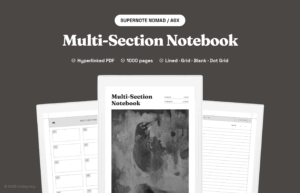
- Notebooks with sections. Every notebook has a tappable index and a breadcrumb at the top of each page that takes you back up a level. The Multi-Section Notebook has ten sections you name yourself, each with its own index.
- Sized for your screen. We draw each file for one tablet size, so the pages fill your screen, with a margin on both sides for the toolbar.
- Painted covers. Rabia paints every cover by hand. It’s a small thing, but it’s nice to open.
- Someone to email. If a file doesn’t behave on your tablet, you can write to us and one of us will answer.
A ready-made notebook or planner from us costs between $9 and $18, once, and custom files start at $19. There’s no subscription. You keep the file and can download it again whenever you need it. Each purchase is sized for one tablet, so a different model needs its own size.
The real cost of free
People sometimes say free templates cost you hours of setup. We don’t think that’s true for most people. Downloading a dot grid and setting it as your notebook background takes a couple of minutes.
The time adds up in a different place: building structure yourself. If you want a dated planner from free pages, you’re duplicating pages, writing in dates, and then scrolling to find them later, because nothing links. Some owners enjoy that and make beautiful setups. If you don’t, that’s the job a paid planner does for you.
What to check before you buy any template
Whether you buy from us or someone else, a few questions will tell you if a paid file is worth it. Good sellers answer all of them on the product page.
- Is there a file for your exact tablet? “Works on all e-ink tablets” usually means one file that’s been stretched to fit. Look for your model by name, like Paper Pro, Manta or the 11 inch Kindle Scribe.
- How many pages, and how are they linked? A planner page should tell you whether days link to weeks and months, and a notebook should say how many sections and pages it has.
- Can you try it first? A free sample or a page-by-page preview shows you how it looks on your screen before you pay.
- What happens if it doesn’t work? Check whether the seller fixes files that don’t behave on your tablet, and how to reach them.
- Can you keep it? A one-time PDF stays on your computer and tablet. A template that only lives inside an app or a subscription may not, if you stop paying.
If a seller can’t answer those, a free template you’ve tried is a safer bet than a paid one you haven’t.
When free is enough
Stick with free templates if:
- you mostly take loose notes and don’t need to find old pages quickly;
- you’re happy with your tablet’s built-in lined and grid pages;
- you want to try a layout, like Cornell notes or a habit tracker, before committing to it;
- you like building your own system and enjoy the setup.
When a paid file makes sense
A paid planner or notebook is worth it if:
- you want a full year of dated pages you can move through by tapping, not scrolling;
- you keep notes for several projects or classes and want each in its own section with an index;
- the free files you’ve tried don’t fit your screen or end up under the toolbar;
- you’d rather spend the setup time writing.
You don’t have to pick one
Plenty of owners use both, and the two fit together well on one tablet. A paid planner handles the dated side: appointments, the week ahead, the daily to-do list. Free single pages handle everything loose, like a dot grid notebook for sketches, a lined notebook for meetings that don’t fit anywhere else, or a one-off tracker for a month-long project.
It also keeps the cost down. You only pay for the part that needs structure, and the rest stays free. If you later find yourself wishing a free notebook had sections or an index, that’s a good sign it’s time to look at a paid one, and not before.
Free vs paid e-ink templates: try both first
You don’t have to take our word for any of this. Grab a free single page from eink.fyi, and get our free samples (just enter your email), which give you the first 25 pages of the Multi-Section Notebook and all of January from the 2027 Daily Planner, sized for your tablet and fully linked. Use them for a week. If the free page does the job, great. If you find yourself tapping through the planner sample, you’ll find the full versions for your tablet on our planners and notebooks pages.