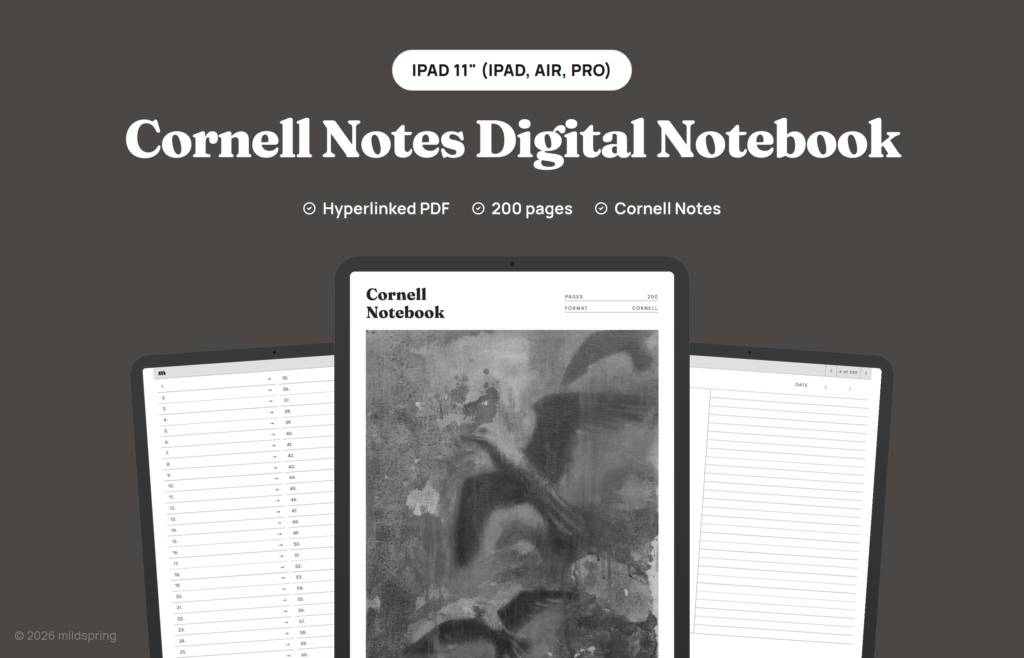
Cornell Notes Digital Notebook for iPad
$9
- Instant download
- Lifetime access
- Works offline
Customize
Want different sections or page styles? Customize this notebook
Also available for






About this notebook
A hyperlinked PDF Cornell notebook for iPad with 200 pages. Each page has a cue column, a wide notes area and a summary band, with a linked index. Works in Goodnotes, Notability, Noteshelf, CollaNote and Apple Books.
The Cornell Notes Digital Notebook for iPad is a cornell notes iPad PDF with 200 undated pages in the classic three-zone layout: cue column on the left, lined notes on the right and a summary band along the bottom. Students use it for lecture notes and textbook reading. Others keep it for course review or reading notes from work.
The file opens on its cover. Tap Go to index and you land on a Notes Index with 200 numbered rows. Tap a row and you jump to that page. The bar at the top of every writing page takes you back to the index, and its arrows step to the next or previous page. You write with your Apple Pencil in the notes app you already use.
The cover artwork was painted by Rabia, who hand-paints the cover of every mildspring product.
Works with five iPad apps
Before listing it, we loaded this notebook onto an iPad and tapped through it in five apps. The index rows, the arrows and the links back all landed on the right page in each one. A few apps ask a question on import, so here’s what to pick.
- Goodnotes: import it as a new notebook. Links work while the pen is selected. The free plan holds three notebooks, and this one counts toward them.
- Notability: import it as a new note and leave Add space on None. The app’s toolbar floats over the top of the page, so scroll down a little to reach the bar.
- Noteshelf: after a link jump, its Return to Page button takes you back to where you were.
- CollaNote: when it asks whether to add space to write, pick None so the pages keep their size.
- Apple Books: already on your iPad, and handy for reading back through a finished notebook.
Sized for iPad not stretched
We drew this notebook at three page sizes, one for each iPad screen shape. The 11 inch file is 158 by 227 mm for the 11 inch iPad, iPad Air and iPad Pro. The 13 inch file is 197 by 263 mm for the 13 inch iPad Air and iPad Pro. The mini file is 118 by 180 mm.
You pick your iPad at checkout and get the file drawn for that screen. There are no blank bands at the top or bottom, and the side margins stay even. Each file is about 3 MB.
What is inside the cornell notes iPad notebook
- 200 Cornell writing pages, one page per entry, numbered 01 to 200.
- A Notes Index with a row for every page: three pages long in the 11 and 13 inch files, four in the mini.
- Cue column, notes block and summary band on every writing page.
- Topic and date fields so you name the lecture, chapter or meeting yourself.
- A link bar on every writing page with the index link and next and previous arrows.
- PDF bookmarks for the cover and the index, for apps that show an outline.
How it works
It’s one hyperlinked PDF. There’s no extra app to install and nothing to sync. Download it on your iPad, open it from Files and import it into your notes app as a new notebook. Once it’s in, the links work offline.
In a lecture, the right-hand block takes your notes while you listen. Short cues and questions go in the left column. After the session you write a two-line recap in the summary band. When you review, skim the recaps first, then tap back to the index when you need a different topic.
The same Cornell notebook is drawn for other tablets too, so there are Supernote, Kindle Scribe, reMarkable and Quaderno versions, each cut to that screen.
Frequently asked questions
Which iPad size do I pick?
The one that matches your screen. Pick 11 inch for the 11 inch iPad, iPad Air and iPad Pro, 13 inch for the 13 inch iPad Air and iPad Pro, and mini for the iPad mini. Not sure which you have? Settings, then General, then About shows the model name.
Do I need an Apple Pencil?
No. Links work with a finger tap, and you can write with any stylus your app supports.
Will writing on a page set off a link?
Not in our tests. In Goodnotes and Noteshelf, pen strokes over a page stayed as ink. Tap with your finger when you want to follow a link.
A link took me to the wrong page. What now?
Delete the notebook in your app and import the PDF again as a new notebook. If it still happens, email us and we’ll sort it out.
How many files do I get?
One PDF for the iPad size you pick. Every page is already the Cornell layout, so there’s no separate lined or blank file.
Is it dated?
No. You fill in the topic and date on each page, so you can start any day and use the 200 pages in any order.
iPad and Apple Books are trademarks of Apple Inc., registered in the U.S. and other countries and regions. Goodnotes, Notability, Noteshelf and CollaNote belong to their makers. mildspring is not affiliated with any of them.
Delivery and refunds
Delivery
Instant download after checkout. Add the PDF to your device with its companion app or cloud sync. Need help? See our step-by-step guides.
Refunds
Since these are digital files, we can't offer refunds after download. If something is wrong with your file, get in touch and we'll make it right.