Planner · school
Student Planner for a Semester or School Year
Your class schedule, assignments, lecture notes and exam prep in one linked file that works for any term.
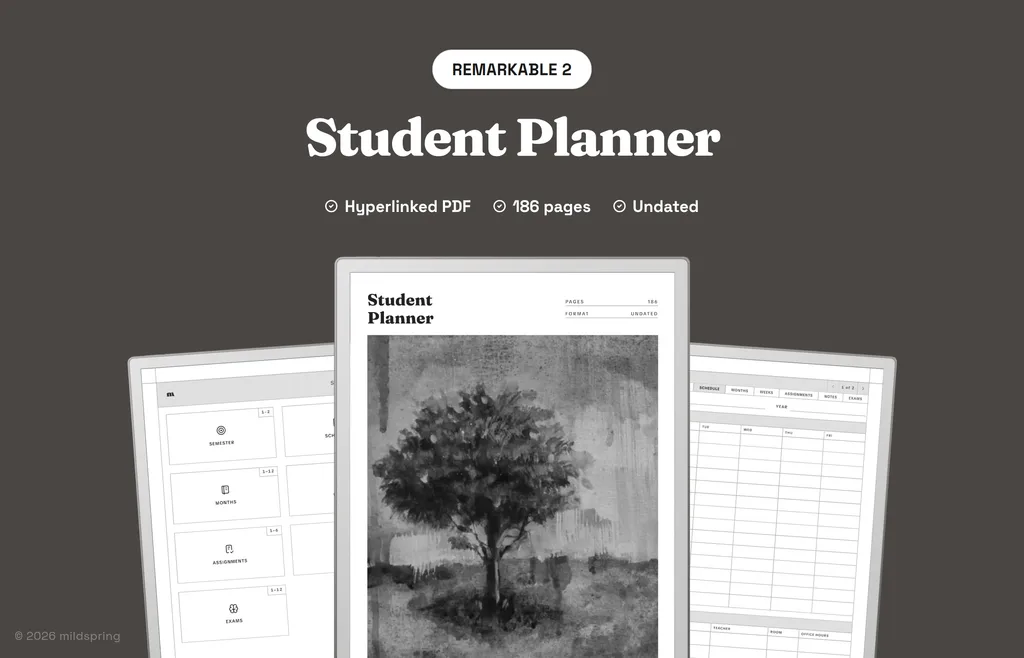
- 186 pages
- 100 Cornell note pages
- Assignment and exam pages
- Undated
- 19 tablet models
$9 pay once, download and keep
1 · Your tablet
2 · Model
Or get every notebook, planner and puzzle book in the Everything Bundle.
This student planner keeps a whole term in one place: your classes, your deadlines, your lecture notes and your exam prep. It’s undated, so it works for a high school year, a college semester or a single quarter. Start in August, January or the week you buy it.
What goes in the planner
- Semester: 2 pages for the term and year, each course with its teacher, room, class times and exam date, and a list of key dates.
- Schedule: a Monday to Friday timetable and a list of your classes with teacher, room and office hours.
- Months and weeks: 12 undated month grids and 52 weekly pages with hours from 7am to 9pm.
- Assignments: 6 pages with the due date, course, task, grade and a box to tick when it’s done.
- Notes: 100 Cornell pages with a cue column and a summary box.
- Exams: 12 pages, one per exam, with topics to mark Not yet, Almost or Ready.
That’s 186 pages to write on, plus the cover and an index for each part.
How you move around it
A row of tabs runs along the top of every page: Overview, Semester, Schedule, Months, Weeks, Assignments, Notes and Exams. Tap one and you’re there. Each part opens on its own index, so lecture 37 or week 12 is two taps away, and the breadcrumb takes you back up. On smaller screens the tabs sit in two rows so every label stays readable.
The cover is a close-up of Rabia’s Lone tree painting. The planner is drawn at each tablet’s own page size and comes for reMarkable, Kindle Scribe, Supernote, BOOX, Kobo, Quaderno and iPad.
Pick the file for your tablet
Same pages on every tablet, drawn at each screen's own size. Each link opens that brand's page with its models.
| Tablet | Models | Price |
|---|---|---|
| Student Planner for reMarkable | reMarkable 2, reMarkable Paper Pure, reMarkable Paper Pro, reMarkable Paper Pro Move | $9 |
| Student Planner for Kindle Scribe | Kindle Scribe (2024, 10.2"), Kindle Scribe 11" (2025) / Colorsoft | $9 |
| Student Planner for Supernote | Supernote Nomad / A6X, Supernote Manta (A5X2) | $9 |
| Student Planner for BOOX | BOOX Note Mini C (8.5"), BOOX Tab Mini C (7.8"), BOOX Note Air 10.3", BOOX Tab X C / Note Max 13.3" | $9 |
| Student Planner for Kobo | Kobo Libra Colour, Kobo Sage, Kobo Elipsa / Elipsa 2E | $9 |
| Student Planner for Quaderno | Fujitsu Quaderno A5 | $9 |
| Student Planner for iPad | iPad mini, iPad 11 inch (iPad, Air, Pro), iPad 13 inch (Air, Pro) | $9 |
Questions
Is the student planner dated?
No. You write the month and the dates in yourself, so it works for any school year, semester or quarter.
Does it work for college?
Yes. The semester and schedule pages fit high school terms and college semesters alike, and the assignment pages have a grade column.
What kind of note pages are inside?
100 Cornell pages, with a cue column, a notes area and a summary box at the bottom.
How do I get around the file?
A row of tabs runs along the top of every page. Tap one to jump to that part, or use the breadcrumb to go back up.