Journal · books
Reading Journal Template for 100 Books
A year of reading in one linked file: a goal page, a page for every book, your favorite lines and a look back at the end.
- 100 book pages
- 24-prompt reading challenge
- Quotes and series pages
- Undated
- 19 tablet models
$9 pay once, download and keep
1 · Your tablet
2 · Model
Or get every notebook, planner and puzzle book in the Everything Bundle.
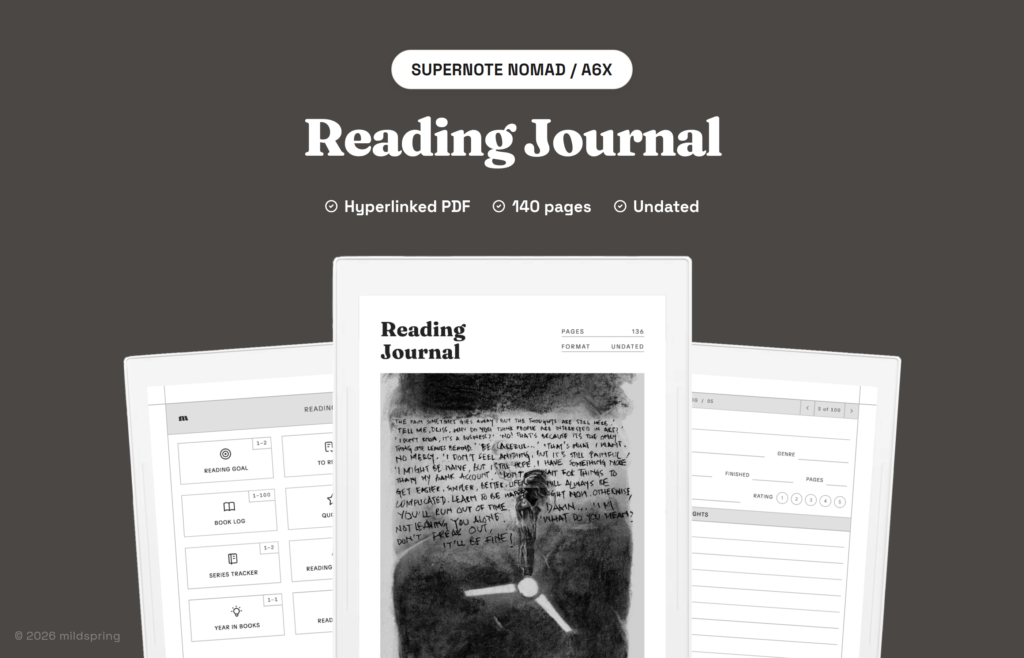
This reading journal template keeps your whole reading year in one place. Set a goal of up to 100 books on the first page, and each number on that list opens a page for that book. Around the book pages sit a to-read list, favorite quotes, a series tracker, a reading challenge and a year in review. It comes to about 140 pages, all linked.
What goes on a book page
Each book gets one page with room for the title, author and genre, the dates you started and finished, the number of pages and the format. There’s a rating from 1 to 5, space for notes, and a line for the one sentence you want to remember.
Fill it in as you read or all at once when you finish. Either way, the goal page slowly turns into a reading log you can scan at a glance, and every number on it is a shortcut back to that book.
The rest of the journal
- To-read list: 8 pages with a box to tick when you get the book.
- Quotes: 12 pages of favorite lines, with the book and page for each.
- Series and challenge: a series tracker for each author and how far you’ve read, plus 24 prompts, from a book in translation to one you’d never usually pick.
- Year in books: books and pages by month, your book of the year and what you want to read next.
There are also 10 lined pages for longer reading notes, like a book club summary or thoughts on a slow read you want to come back to.
Nothing is dated, so you can start in January or in August. A contents page and a breadcrumb on every page get you around, and the file has bookmarks for each section too. The journal is drawn at each tablet’s own page size and comes for Supernote, reMarkable, Kindle Scribe, BOOX, Kobo, Quaderno and iPad.
Pick the file for your tablet
Same pages on every tablet, drawn at each screen's own size. Each link opens that brand's page with its models.
| Tablet | Models | Price |
|---|---|---|
| Reading Journal for Supernote | Supernote Nomad / A6X, Supernote Manta (A5X2) | $9 |
| Reading Journal for Kindle Scribe | Kindle Scribe (2024, 10.2"), Kindle Scribe 11" (2025) / Colorsoft | $9 |
| Reading Journal for reMarkable | reMarkable 2, reMarkable Paper Pure, reMarkable Paper Pro, reMarkable Paper Pro Move | $9 |
| Reading Journal for Quaderno | Fujitsu Quaderno A5 | $9 |
| Reading Journal for BOOX | BOOX Note Mini C (8.5"), BOOX Tab Mini C (7.8"), BOOX Note Air 10.3", BOOX Tab X C / Note Max 13.3" | $9 |
| Reading Journal for Kobo | Kobo Libra Colour, Kobo Sage, Kobo Elipsa / Elipsa 2E | $9 |
| Reading Journal for iPad | iPad mini, iPad 11 inch (iPad, Air, Pro), iPad 13 inch (Air, Pro) | $9 |
Questions
How many books can I log?
Up to 100. Each one has its own page, linked from the reading goal list.
Is it dated?
No. There are no dates or weekdays printed, so you can start any time and use it for any year.
What is the reading challenge?
A page of 24 prompts to try over the year, from a book in translation to one you'd never usually pick.
Can I keep quotes in it?
Yes. There are 12 pages for favorite quotes, with space for the book and page number.