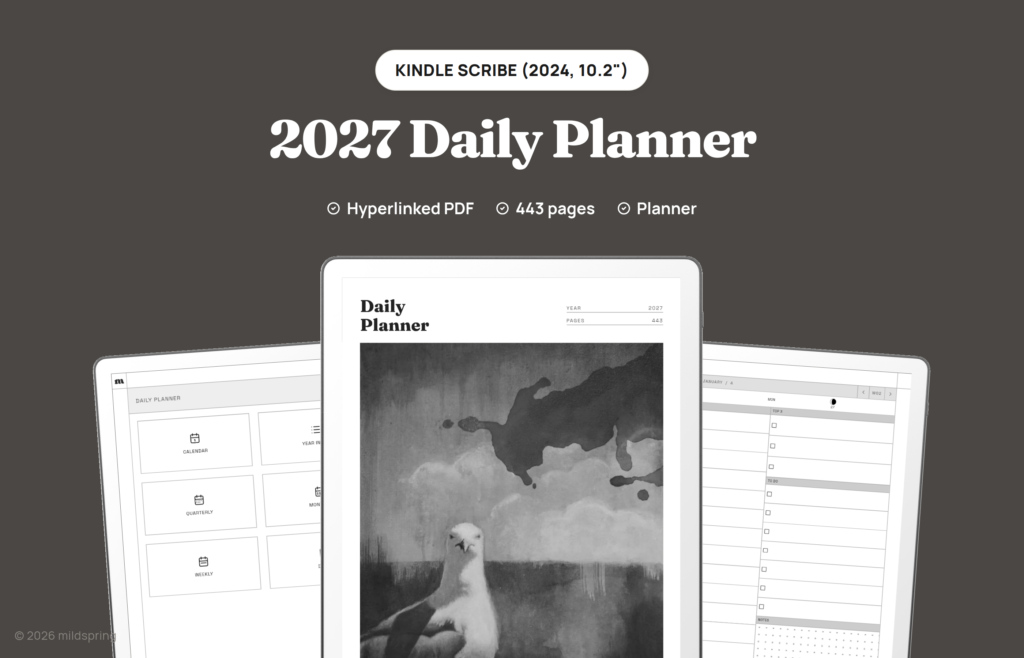
2027 Daily Planner for Kindle Scribe
$14
- Instant download
- Lifetime access
- Works offline
Customize
Want a different start month or daily layout? Customize this planner
Also available for






About this planner
A 2027 Kindle Scribe daily planner that does the linking for you: every day of 2027 has its own page with an hourly schedule, a Top 3 and to-dos, one tap from the year, month and week. Sunday-start and Monday-start versions are both included.
The 2027 Daily Planner for Kindle Scribe is a dated, hyperlinked PDF that covers every day from January 1 to December 31, 2027. It’s a 2027 Kindle Scribe planner for people who plan one day at a time: appointments, work blocks, the three things that matter today, and the to-do list around them.
Every page links to the next level up and down. Start on the contents page, tap a month, tap a week number, then tap a day. The breadcrumb along the top of each page takes you back to the week, month, quarter or year, and the arrows step to the previous or next day. Twenty-one PDF bookmarks cover the main stops: cover, contents, calendar, year index, each quarter, each month and the weekly section.
Weeks start on Sunday or Monday (both versions are included), and the monthly and daily pages show the moon phase for each date.
What is inside the 2027 Kindle Scribe planner
- A year calendar with all twelve months on one page.
- A six-page year index with one row for every day, two months per page, so you can note what happened and find it later.
- Four quarterly pages, each with that quarter’s three months, a goals list and space for notes.
- Twelve monthly calendars with a week-number column that opens each week, plus a dot grid area for notes.
- Fifty-three weekly pages with a row for each day and a notes row at the bottom.
- Three hundred sixty-five daily pages with an hourly schedule from 6am to 9pm, a Top 3 list, seven to-do checkboxes and a dot grid notes box.
That comes to 443 pages in one file.
How it works
It’s one PDF. Send it to your Scribe with Send to Kindle, keep it as a PDF, open it from your library, and write on any page with the pen. Send to Kindle is the most reliable way to be able to write directly on the pages. Since spring 2026 some owners report they can also write on PDFs copied over USB, but Amazon hasn’t documented it. The links are standard PDF links, so they work in the Scribe’s PDF reader without an extra app.
The dates are printed in, so this file is for 2027 only. If you’d rather build your own sections and pick each page style, our custom notebook builder lets you choose every part, including which side of the page keeps a margin for your toolbar. If you want a plain notebook next to it, the Multi-Section Notebook for Kindle Scribe splits your notes into ten named sections.
Sized for these devices
This planner is made for the Kindle Scribe (2024, 10.2″) and the 11 inch Kindle Scribe (2025) and Kindle Scribe Colorsoft. Pick your screen size at checkout and you get the file drawn for it, so the pages fill the screen instead of shrinking inside a border. It’s the same planner on each one.
Frequently asked questions
Is the planner dated?
Yes. Every page is dated for 2027, from January 1 to December 31. Weeks start on Sunday or Monday: both versions are included.
How many pages does it have?
443. That’s the cover, a contents page, the year calendar, six year index pages, four quarterly pages, twelve monthly pages, 53 weekly pages and 365 daily pages.
Why does week 1 start in December?
Week 1 is the week that holds January 1, so its first few days fall in late December 2026. Those days are left blank, and the same goes for the days of week 53 that fall in 2028.
How do I move between pages?
Tap a month, a week number or a day to jump to it. The breadcrumb at the top of each page takes you back up, and the arrows move one day or one week at a time.
How do I get the file?
After checkout you can download it from your order confirmation page, your order email or My downloads.
Delivery and refunds
Delivery
Instant download after checkout. Send the PDF to your Scribe with Amazon's Send to Kindle and keep it as a PDF, which is the most reliable way to be able to write on it. Need help? See our step-by-step guides.
Refunds
Since these are digital files, we can't offer refunds after download. If something is wrong with your file, get in touch and we'll make it right.
More templates like this
Get every file we make for your Kindle Scribe
26 products in one purchase, $281 if you bought them one by one.
- 8 notebooks and journals
- 10 planners
- 8 puzzle books
- Every product we add later, at no extra cost
$69 $99 one-time
Launch price until 29 December, then $99.
Get the Everything BundleInstant download. Yours to keep, no subscription.