A to Z Index Book for Supernote
$14
One-time purchase, lifetime access.
Also available for
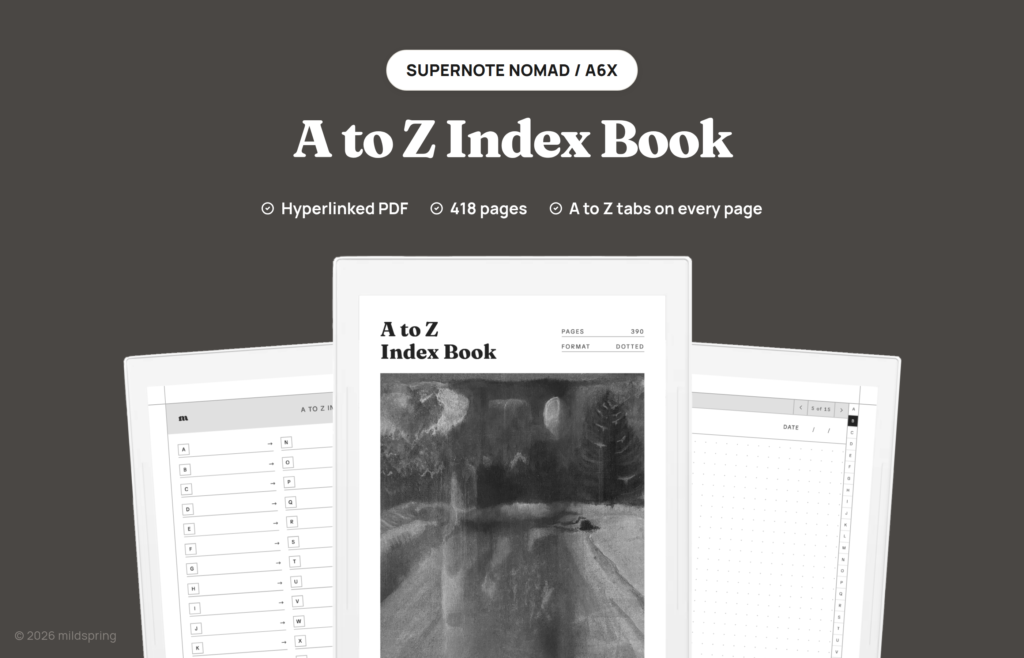
A hyperlinked A to Z index PDF for Supernote Nomad and Manta, with 26 letter indexes, an A to Z tab strip on every page, and 390 dotted pages.
A to Z Index Book for Supernote is a hyperlinked PDF that files your notes by letter instead of by date, the way the alphabet tabs on a paper address book do. We built this A to Z index book Supernote version for the Supernote Nomad and the Manta, and it suits anything you look up by name: people, clients, recipes, words, or books.
Open the book and the main index shows all 26 letters, each with a line where you write what that letter holds. Tap a letter and you land on its own index, which has 15 numbered entries. Tap an entry and you’re on a dotted page that belongs to that one person, recipe, or idea. A narrow A to Z strip runs down the right edge of every index and note page, so jumping from a client under C to a recipe under R is one tap, not a trip back to the front.
The cover painting is by Rabia, who paints the cover art for every mildspring product. This one is a snowy road at night, printed in greyscale for the e-ink screen.
What is inside
- A main index with all 26 letters in two columns, each with a write-on line for naming that letter’s category.
- 26 letter indexes, one per letter, each with a large letter heading, a label line, and 15 numbered entry rows that link to their own pages.
- 390 dotted note pages, one for every entry, with a title and date line at the top.
- An A to Z tab strip on every letter index and note page. The current letter is filled in black so you always know where you are.
- A breadcrumb and page arrows at the top of each note page, so you can step through a letter’s entries or go back to its index.
- Bookmarks for the cover, the main index, and every letter, for readers that show a sidebar outline.
- 418 pages in total, including the cover.
What people file in it
We kept the pages plain on purpose, because an index book is only as useful as what you decide to put in it. A few ways to set it up:
- Contacts and addresses: one entry per person under their last name, with phone numbers, birthdays, and the name of their dog on the same page.
- Clients and collaborators: a page per client with meeting notes, rates, and what you promised them, which turns the book into a small personal CRM.
- A commonplace book: quotes and passages filed by author or theme, so the good lines don’t get lost in a daily journal.
- Research and reading notes: one entry per source, concept, or book, filed by author or title.
- A vocabulary log: new words or field terms filed by their first letter, with examples and definitions on the dotted page.
- Recipes: filed by dish name, ingredient, or cuisine, whichever way you think when you’re hungry.
How the a to z index book Supernote links work
Everything runs in the Supernote’s built-in reader. There’s no app to install and no account to connect, because the links are part of the file itself. The tabs, the index rows, and the breadcrumbs are ordinary links that follow a tap.
Each letter gets the same fixed 15 pages, so nothing renumbers when you skip around. If you add the Smiths before the Abbotts, both land on their own page and stay there.
Made for the Supernote Nomad and Manta
This version is sized for two Ratta screens, and you pick your device at checkout.
The Supernote Nomad (A6X2) and the older A6X share the smaller page at 119 by 159 millimetres. The Supernote Manta (A5X2) gets the larger page at 163 by 217 millimetres. Each file is drawn for its own screen at native size, so the tab strip, the entry rows, and the dot spacing sit where we put them, and the margins stay clear of the floating toolbar whether you dock it on the left or the right.
A version for the original Supernote A5X isn’t available yet. The screens are close but not the same, and we only sell the sizes we’ve actually cut.
The same book is drawn for other screens too, so if you also use another tablet, look at the Kindle Scribe, reMarkable, and Quaderno versions, each cut to that device’s own page size.
Getting it onto your Supernote
After checkout you get one download for the device you picked. Grab it on a computer first so you have a clean copy outside the tablet.
From there the usual routes work: copy the file over USB into the Document folder, drop it through Supernote Partner, or sync it in through the cloud service you already use on the device. Once it’s on the tablet it opens as its own notebook, and your handwriting is saved into the document as you write.
Which of our Supernote notebooks to pick
Pick this book when you look things up by name. Pick the Multi-Section Notebook when your notes split into a handful of big topics that each need their own contents page, or the Classic Notebook when you want one long general notebook with room to write. If most of your writing happens in lectures or while reading, the Cornell Notes Digital Notebook lays every page out with a cue column and a summary band.
What you get at checkout
One purchase, one file for the model you pick, priced at $14, with no subscription and no expiry. You can re-download it and load it onto your own devices as many times as you need.
Frequently asked questions
How many pages do I get?
418 pages: the cover, the main index, 26 letter indexes, and 390 dotted note pages, one for each of the 15 entries under every letter.
Is this a single PDF?
Yes. One file for the device you choose at checkout.
Which Supernote models does this fit?
The Nomad (A6X2) and A6X at 119 by 159 mm, and the Manta (A5X2) at 163 by 217 mm. Choose your device at checkout. A version for the original A5X is not available yet.
What happens when a letter fills up?
Each letter has 15 entries and that number is fixed in the file. Busy letters like S or M can fill first. Because every letter has its own label line, you can also give a big topic two letters, for example clients under C and suppliers under S.
Is it dated?
No. Every note page has a title and date line you fill in yourself, so you can start any day of the year.
Do I need an app or an internet connection?
No. Once the file is on your Supernote, it works offline in the built-in reader.