We have bought more notebooks than we care to count. Physical ones, digital ones, hyperlinked PDF notebooks, Moleskines stacked in a drawer. We have gifted them, recommended them, and filled them. Choosing between the types of notebook lines (lined, dot grid, grid, or blank) should come down to what you actually do with the page, not on what kind of person you think you are.
The short answer: pick lined for long-form writing, dot grid for mixed notes and sketches, grid for diagrams and anything technical, and blank for freeform drawing. If you pick lined, the spacing matters too: wide, college, and narrow ruled all fit different handwriting. The same logic applies whether you are buying a paper notebook or a PDF notebook for your tablet or e-ink device.
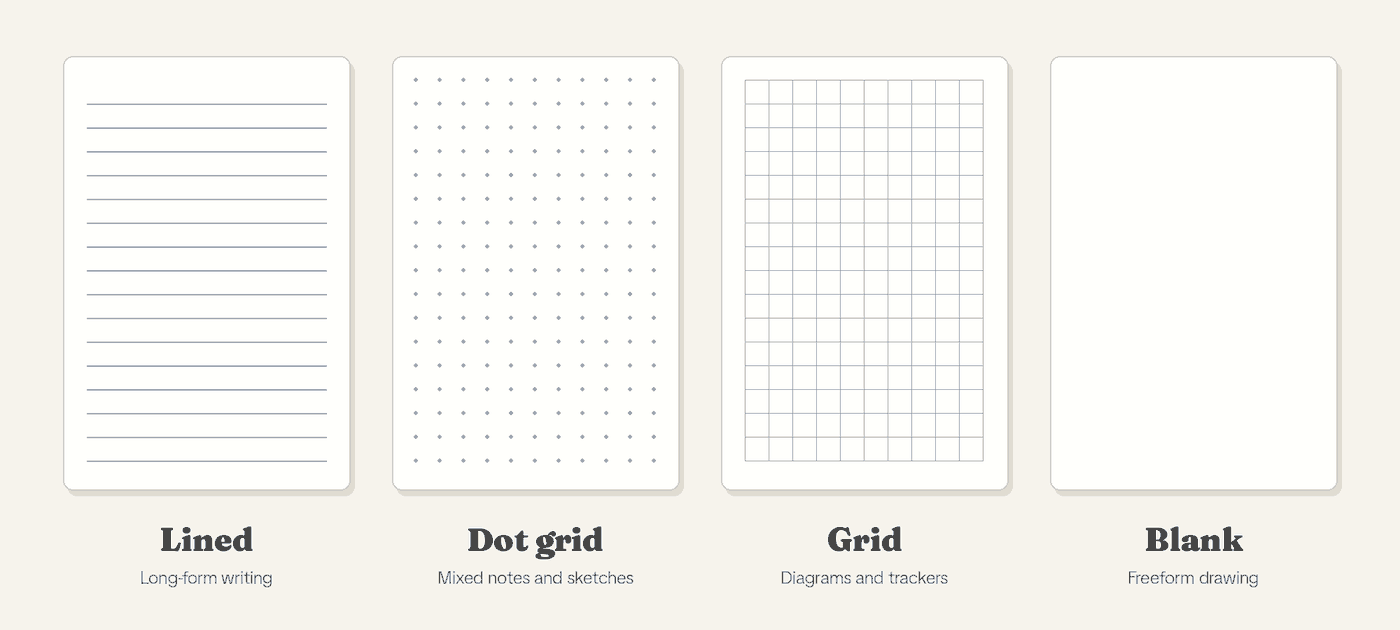
| Page style | Best for | Watch out for |
|---|---|---|
| Lined | Journaling, drafting, long-form notes | Rigid line height gets in the way of sketches |
| Dot grid | Mixed notes, tables, bullet journals, light sketching | Dots are faint, so very precise scale drawing is harder |
| Grid | Diagrams, drawing to scale, trackers | Squares can feel busy under plain writing |
| Blank | Freeform sketching and idea maps | Handwriting drifts without guides |
Table of Contents
Types of Notebook Lines, Explained Simply
Before getting into recommendations, it helps to understand what each format gives you and what it takes away.
Lined (Ruled) Notebooks
Lined notebooks are the default. They are what most of us grew up with in school, and they are still what you will find in every stationery aisle and notebook template store on the planet. The horizontal lines help you write in straight rows and keep your handwriting consistent.
The constraint is the point. Lines keep your text aligned and readable, and they give you a natural rhythm when writing long-form content. Lined pages are the better fit when the page is mostly sentences:
- Meeting notes, daily standups, and status updates
- Cornell-style study notes where the cue column needs clear rows
- Personal journaling where readability beats layout experiments
The downside is that lines are rigid. They dictate a specific line height, and they actively get in the way the moment you want to do anything other than write words left to right. On a tablet or e-ink reader, this is even more noticeable because you cannot easily flip to a blank page mid-session.
Ruled Line Spacing: Wide, College, Narrow, and More
“Lined” is not one thing. The gap between lines changes how a page feels more than most people expect, and the names change depending on where you buy.
| Ruling | Line spacing | Good for |
|---|---|---|
| Wide ruled (US) | 11/32 in (8.7 mm) | Large handwriting, younger writers |
| College ruled (US) | 9/32 in (7.1 mm) | Everyday notes for most adults |
| Narrow ruled (US) | 1/4 in (6.4 mm) | Small handwriting, fitting more per page |
| Gregg ruled | 3 lines per inch, center line | Shorthand and steno pads |
| Japanese A ruled | 7 mm | Standard everyday writing |
| Japanese B ruled | 6 mm | Smaller handwriting |
| Japanese C ruled | 5 mm | Fine handwriting, dense notes |
The US figures come from the ruled paper entry on Wikipedia. The A, B, and C figures come from KOKUYO’s guide to its notebook rulings, which also lists U (8 mm) and UL (10 mm) for larger handwriting. College ruled (7.1 mm) and A ruled (7 mm) are nearly the same, so if you like one you will probably like the other.
A quick test: write a normal sentence. If your descenders (the tails on g, p, and y) touch the next line, go wider. If there is a lot of empty space above each word, go narrower.
Blank (Unruled) Notebooks
A blank page is total freedom, which is either thrilling or paralyzing depending on what you are trying to do with it. There are no guides, no constraints, no structure. You can write diagonally, sketch across the full page, draw large diagrams, map out ideas spatially, or mix text and illustration in whatever arrangement makes sense in the moment.
The challenge with blank notebooks is that if you want to write in straight lines, you either train yourself to write naturally level or you find yourself drifting across the page. For pure writing tasks, most people find blank pages harder to use than they expected, whether on paper or on a screen.
Dotted vs Lined: What Is a Dot Grid Notebook?
Dot grid is lined and blank at the same time. A regular grid of subtle dots covers the page, giving you enough visual guidance to write in rows and draw straight lines, while remaining visually quiet when you are not actively using the structure. The dots are far less dominant than printed lines or a full grid, which makes the page feel open even when you are using it as a guide.
This is the format we use most now, and it is the one we recommend most often. The dot grid gives you the flexibility of a blank page with just enough scaffolding to keep things tidy. You can write, sketch, create tables, draw diagrams, map out a layout, or do all of those things on the same page. The page does not fight you. Dot grid earns its keep on pages like these:
- Product sketches with short labels
- Language study with characters and romanization
- Planner spreads and bullet journal collections where you draw your own boxes, calendars, and trackers
On a tablet or e-ink device, dot grid pages look especially clean. The dots recede into the background and let your handwriting or stylus strokes take centre stage, which is part of why dot grid has become so common in PDF notebook templates.
What Is a Grid Notebook? (Grid vs Graph Paper)
A grid notebook covers the page in a regular pattern of small squares. This gives you the most precise spatial reference of any format, making it easy to draw to scale, create accurate diagrams, align elements precisely, and work with anything technical. People use “grid paper” and “graph paper” for the same square-ruled layout, so if you are comparing the two, you are mostly comparing names.
Grid is less popular in general stationery circles but has a devoted following among engineers, architects, mathematicians, and anyone who works with spatial information regularly. The squares can feel visually busy if you are just trying to write prose, but for technical work they are genuinely useful in a way no other format matches. In a PDF notebook, grid pages also work well for budgeting layouts, habit trackers, and anything where column alignment matters.
How Page Styles Behave on E-Ink
On an e-ink tablet, a few things change that paper never had to deal with.
- Line spacing should match your hand. Too tight and your descenders collide with the next row. Too wide and you waste screen space on a display that is already smaller than a paper page.
- Erasing shows differently. Heavy erasing is noticeable on any style, but dot grid hides corrections a little better because there is no solid line to break. On lined pages, sloppy erasure is obvious.
- Exports have an audience. If you email pages to coworkers, lined meeting notes look familiar. Dot grid exports read more like a designer’s notebook. Neither is wrong. Match the people reading them.
Stop Choosing Based on Personality. Choose Based on Work.
Most notebook guides will tell you that creatives prefer blank, organised people prefer lined, and technical minds prefer grid. This framing sounds intuitive but it is not especially useful, because the same person can be creative, organised, and technical depending on the day or the project.
A better question to ask is: what am I actually going to write or draw in this notebook?
The format should follow the function. We learned this through our own notebooks, not through a personality quiz.
When we were writing more (journaling, drafting posts, taking long-form notes), we used lined notebooks. They were the right tool for that work. The structure kept our writing readable and the constraint was not a problem because we were doing one thing: writing words.
As our use of notebooks expanded to include sketching, mapping out product ideas, mixing diagrams with notes, and working on things where spatial thinking mattered, the lined format started getting in the way. We moved to dot grid and never looked back. The dot grid suits the work we do now. It is as simple as that.
A Case Study: The Engineer Who Swears by Grid
We have a close friend who is a web developer. Every time we try to get him to use a dot grid notebook (and we have gifted him several), he ends up going back to grid.
At first we thought he was just stubborn. Then we watched him work. He was not taking notes or journaling. He was drawing system architecture diagrams, sketching component layouts, mapping data flows, and doing the kind of spatial, technical, precision-oriented thinking that his job demands. The grid squares gave him a consistent unit of measurement he could use across the page. He could make boxes the same size, draw proportional diagrams, and align elements accurately without any additional tools.
For him, grid is not a preference. It is the correct tool for his actual work. Dot grid or blank pages would make his work harder, not easier. If he switched to a PDF notebook on his tablet, he would want grid pages for exactly the same reason.
The Case for Mixed Format Notebooks
One thing we have come to appreciate over time is that most people do not do just one type of work in a single notebook. You might start a session writing a to-do list, move into sketching a layout, and end up drafting a few paragraphs of notes. No single format handles all of that equally well.
This is one of the advantages that PDF notebooks have over physical ones. You can keep a lined notebook and a dot grid notebook as two files on the same device, or use a single file that mixes page types, and switch between them without carrying multiple books.
You also do not have to pick one style for the whole year. A multi-section notebook lets you keep lined pages for work meetings and dot grid for side projects. The trick is labeling sections so you do not default everything to the first one. Our guide to ten-section notebooks explains how many sections most people actually use before a layout gets messy.
If you are new to PDF notebooks, this flexibility is worth paying attention to. You are not locked into a single format choice the way you are with a physical notebook. Our guide to what a hyperlinked PDF is explains how the jumping between pages works.
Grid vs Lined Notebook Picks We Actually Sell
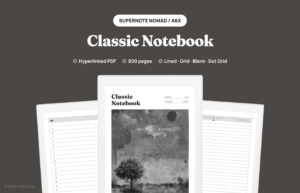
If you want these page styles in a hyperlinked PDF, the Classic Notebook for Supernote comes as four separate 500-page files in one purchase: lined, blank, dot grid, and grid, so you can keep two styles open as two different books. For work that needs separate projects, there is the Multi-Section Notebook. And if you want an undated planner layout, the Bullet Journal for Supernote is built on dot grid pages with a linked index. If you plan to bullet journal, our post on the best page style for bullet journaling goes further.
Frequently Asked Questions
What are the main types of notebook lines?
Lined (ruled) with wide, college, or narrow spacing, plus dot grid, grid, and blank. Each suits a different kind of work, as the table above shows.
What is the difference between college ruled and wide ruled?
Line spacing. College ruled lines are 9/32 inch (7.1 mm) apart, and wide ruled lines are 11/32 inch (8.7 mm) apart. College ruled fits more lines on a page and suits most adult handwriting. Wide ruled gives larger handwriting more room.
Is a dotted or lined notebook better?
Lined is better for pure writing. Dotted is better when you mix writing with lists, tables, and sketches, because the dots guide you without forcing a line height.
What is the difference between a grid and a dot grid notebook?
A grid notebook has full square lines. A dot grid notebook has only a dot at each corner, so the page looks much cleaner. Grid is better for precise diagrams. Dot grid is better for everyday mixed notes.
Can I use more than one page style in a PDF notebook?
Yes. You can keep one file per style, or use a notebook that mixes page types in a single file with hyperlinks to jump between sections.