Table of Contents
If you want a cleaner way to study, run meetings, or process research on your Supernote, Cornell notes are one of the simplest upgrades you can make. Three sections on every page, a quick review at the end, and you stop re-reading messy notes you never come back to. This is a full walkthrough of cornell notes supernote setup, from templates to the daily review routine.
This walkthrough covers the method itself, how to set it up on the Supernote A5 X2 Manta, A6 X2 Nomad, and other models, the pen settings that actually matter, and a review routine that does not feel like extra homework.
What the Cornell note-taking method actually is
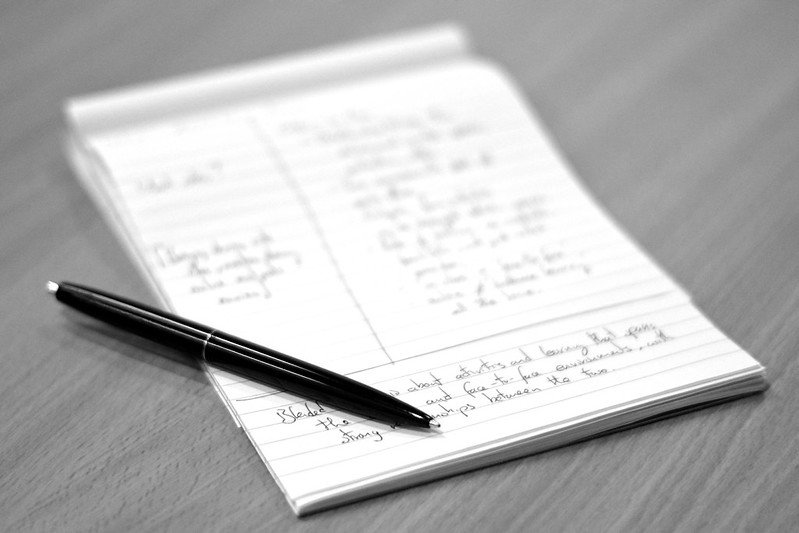
The Cornell method was developed by Walter Pauk, an education professor at Cornell University, and described in his book How to Study in College. The page is split into three zones:
- Notes area (right column). The biggest zone. You write here in real time during a lecture, meeting, or while reading.
- Cues column (left column). A narrower strip on the left. You fill it in after the session with keywords, questions, and prompts that match the notes on the right.
- Summary (bottom strip). A few lines at the bottom of the page where you write a short summary in your own words, again after the session is over.
The point is not the layout. The point is the workflow. You capture, then process, then review. Most people stop at capture, which is why their notes feel useless a week later.
Why Cornell notes work well on the Supernote
Paper Cornell pads have a fixed layout you cannot change. On an e-ink tablet, you get the same structure with a few advantages that paper does not have:
- You can use the same template forever, with no refills.
- You can tag pages, star them, or move them between notebooks.
- You can search handwriting on Supernote (English and several other languages), so cues you write later turn into a real index.
- You get the matte, paper-like writing feel that makes long sessions less tiring on the eyes than a glossy iPad.
The Supernote A5 X2 Manta is closest in feel to a Cornell pad in size. The A6 X2 Nomad still works but the cues column gets tight on a smaller screen, so you may want a layout with a wider notes area and a slimmer cues strip.
Cornell notes Supernote setup, step by step
The basic idea is: load a Cornell PDF template into your Supernote, then either write directly on it or import it as a notebook template. Two paths.
Option 1: Use a PDF as a custom template
- Connect your Supernote to your computer with USB, or use the Browse & Access wireless transfer.
- Copy the Cornell PDF into the
MyStylefolder on your Supernote storage. - Open a new notebook on your device, tap the template icon, switch to MyStyle, and pick the file.
- Every new page in that notebook now uses the Cornell layout.
Option 2: Use a hyperlinked PDF notebook
If you prefer a single PDF that already has multiple Cornell pages plus an index, drop the PDF directly into your Document folder and write on it like any other PDF. The advantage: you can link a table-of-contents page to each Cornell page and jump around quickly. The downside: you cannot add infinite pages on the fly, you are bound by what is in the PDF.
The right pen settings for Cornell notes
Cornell pages get crowded fast if your strokes are too thick. On Supernote, the InkSpace pen at the thinnest two or three settings is usually the sweet spot. A few practical defaults:
- Notes column: InkSpace pen, thin or medium-thin, for body text.
- Cues column: Needlepoint or Fineliner, thin. You want compact keywords, not paragraphs.
- Summary strip: Same as the notes column. Two or three sentences max.
- Highlighter: Light grey at medium thickness. Avoid pure black highlighter, it can muddy the page on e-ink.
A simple Cornell notes workflow for lectures on Supernote
During a lecture or class, you want to capture without thinking about formatting. The Cornell layout helps because your decision is already made: write in the right column, nothing else.
- Write the date and topic at the top of the page before the lecture starts.
- During the session, write in the notes column only. Short bullets, not full sentences. Use indents for sub-points.
- If you miss something, leave a small gap and a question mark instead of pausing to catch up.
- Within 24 hours, fill in the cues column with keywords and questions that match each block of notes.
- Write a two-to-three-sentence summary in your own words at the bottom.
That 24-hour processing step is the one most people skip. It is also the one that does most of the learning. Without it you have a clean-looking page and no recall.
Using Cornell notes for meetings
The same layout works for work meetings, and it is honestly more useful here than in classrooms. Most meeting notes are a wall of bullets that nobody reads. Cornell forces you to extract the few things that actually matter.
A small tweak that helps in meetings:
- Use the cues column for action items and owners. Names, deadlines, decisions.
- Use the notes column for context, what was said, what was rejected, why.
- Use the summary strip for the one outcome of the meeting. If you cannot write it, the meeting did not have one.
You will start noticing meetings that produce no summary. That is information.
Using Cornell notes for reading and research
For books, papers, and articles, the Cornell layout doubles as a reading log on your Supernote. One page per chapter or per paper, roughly.
- Notes column: Direct quotes, page numbers, short paraphrases.
- Cues column: The questions you would ask the author. Themes. Cross-references to other notes.
- Summary strip: What this chapter or paper added to your thinking.
Once you have a stack of pages like this, the cues column becomes a search index. On Supernote, run a handwriting search for a theme and you get every page where you flagged it. Try doing that with paper Cornell pads.
The review routine that makes it stick
Cornell only works if you actually review. The review is small, fast, and not optional.
- Daily (under 5 minutes): Cover the notes column with your hand or a sheet. Look at the cues. Try to recall the notes from memory. Uncover and check.
- Weekly (10 to 15 minutes): Read just the summary strips for the week. This is your highlights reel.
- Monthly (20 minutes): Star or tag the pages that still matter a month later. Archive the rest.
This loop is closer to spaced repetition than to re-reading, and it does more for retention with less time spent.
Handwriting search: turning cues into an index
One thing paper Cornell notes cannot do is search. On Supernote, handwriting recognition (Recognize Handwriting) turns the cues column into something close to a personal search index. The catch: it only works if you fill the cues in honestly and consistently.
- Pick keyword conventions early. Singular over plural. Always the same spelling. Decide once whether you write “K8s” or “kubernetes” and stick to it.
- Write cues in print, not cursive. Recognition accuracy on Supernote is much higher with clear printed letters.
- Limit each cue to one to three words. Long phrases are harder to recall and harder to search.
- Use a leading symbol for tags. A small
#or@before a tag word makes filtering easier.#exam,@projectX.
Once you have a few weeks of pages built up, a search for one cue word usually surfaces every Cornell page where it appeared. That is when the system starts paying off, not on day one.
How long does it actually take per page
One worry people have before trying this method is that the cues and summary steps will add too much time on top of regular notes. In practice, the overhead is small once it becomes habit.
- Capture during the session: the same time you would spend on any other notes.
- Cues column, after the session: roughly two to four minutes for a page covering an hour of class or meeting.
- Summary strip: one to two minutes if you do it right after the session, while the content is still fresh.
Call it five minutes of processing per page. The trade is the time you currently spend re-reading older notes trying to remember what they meant, plus the cost of forgetting things that were never properly encoded. Five minutes wins.
Folder structure that keeps Cornell pages findable
The Supernote file system is a folder tree. With Cornell notes, structure matters more than for one-off scribbles, because the value compounds when related pages live together.
A simple structure that holds up over a semester or work year:
- Top level: one folder per role or domain. Examples: School, Work, Reading.
- Second level: one notebook per subject, project, or course inside that domain.
- Inside each notebook: chronological Cornell pages, with the first page reserved as a manual index of starred or important pages.
If you tag in the cues column (the #exam, @projectX trick) the index page is less important. Handwriting search will get you there. But a manual index is a useful safety net for the pages you know you will revisit.
Common mistakes to avoid
- Filling in cues during the lecture. Defeats the point. Cues are a reflection step, not a capture step.
- Writing essays in the notes column. Bullets and short phrases beat full sentences for recall.
- Skipping the summary. Without a summary you have notes, not understanding.
- One Cornell notebook for everything. Split by subject or project. The cues column only works as an index if the scope is narrow.
- Trying to make it pretty. Cornell is a thinking tool, not a bullet journal spread. Plain writing beats decoration.
Cornell vs other note systems on Supernote
Cornell is not the only structured method that runs well on e-ink. A quick comparison:
| Method | Best for | Friction on Supernote |
|---|---|---|
| Cornell | Lectures, meetings, reading | Low. Static template, one page per session. |
| Bullet journal | Daily life, habits, planning | Medium. Lots of layout work each week. |
| Zettelkasten | Long-term research, writing | High. Needs linking and IDs, easier on a computer. |
| Plain notebook | Quick capture, no structure | Lowest. Also lowest payoff for review. |
If you are choosing one method for school or work and you want to stop fiddling, Cornell is the most boring and the most useful of the four.
Which Supernote model fits Cornell best
- Supernote A5 X2 Manta. The most comfortable for full Cornell pages. Closest to a paper Cornell pad in size.
- Supernote A6 X2 Nomad. Works, but tighten the cues column and shrink your handwriting. Better for meetings than long lectures.
- Older A5 X and A6 X. Same approach as their X2 successors. Layouts that work on X2 work here too.
If you are buying for note-taking specifically, the A5 size pays back the price difference within a semester of heavy use.
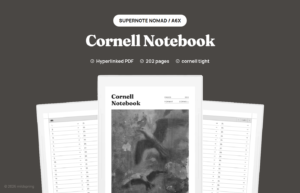
If you want the layout already drawn, we make a Cornell Notes Digital Notebook for Supernote: cue column, notes area, and summary band on every page, with a linked index so you can jump back without hunting.